
Our game uses protothreads to allow for multitasking across the RP2040's two cores. The program executes timing-sensitive graphic output and physics updates on core 0, while asynchronous input processing occurs on core 1. Our audio synthesis runs outside the protothread scheduler using hardware timer interrupt mechanism and direct memory access (DMA).
protothread_anim: Animation, Physics, and Rendering
protothread_anim is responsible for animation,
physics updates, collision detection, scoring, and VGA rendering. This
protothread executes on core 0, once per video frame, or about 33 ms per frame. This portion of
the program is structured as a frame-by-frame loop with a sequence of stages executing once per frame.
The bird's motion and orientation are represented using a small set of fixed point variables:
bird_y (fix15) - The vertical position of the bird, with lower values being higher on the screen.bird_x (fix15) - The horizontal position of the bird, which remain constant, simplifying the calculations.bird_vy (fix15) - The vertical velocity of the bird.bird_angle_deg (fix15) - The rotation angle of the bird, in degrees.
Pipe state is stored using arrays with each index representing a vertical pipe-pair. Each pair has its y position
stored in pipet_y[i] and pipeb_y[i] (top and bottom pipe). Additional Boolean arrays like pipe_scored[i] and
pipe_just_reset[i] track scoring state and ensure the pipes scroll smoothly off and into the screen without visual artifacts.
Each frame, gravity is applied to the bird by incrementing bird_vy with a fixed-point gravity constant. The updated velocity is then integrated
into the bird’s vertical position by adding bird_vy to bird_y. When a flap input is detected, bird_vy is immediately set to
a fixed negative value, producing an upward impulse that overrides gravity for that frame.
This portion of the program is modeled by a finite state machine, controlling motion updates, scoring, input handling, and screen rendering.
The FSM consists of three states:
STATE_START
This is the initial state the game stays in after launching or resetting. The positions of the bird and pipes are set, and new updates to
physics are suppressed. Rendering is handled by the draw_start_screen() function, which prompts the player to select a gameplay mode.
Once the first input trigger is received, the code procedes to STATE_FALL.
This is the active playing state, during which physics is applied via gravity, flap-trigger velocity pulses to the bird,
and a constant PIPE_SPEED by which the x-coordinate of the pipes are updated each frame. Each frame, during this state,
all update functions and helpers are called: update_pipes(), update(), and update_bird_angle().
Animations are rendered, and the score is updated. If a collision with a pipe or screen boundary is detected, the program transitions to STATE_END.
During this state, updates are halted and rendering is done by the draw_end_screen() function, which displays a "GAME OVER" message along with
the score upon death and the high score. The code transitions back to STATE_START.

When the game begins the pipe state is reset using init_all_pipes and init_pipe_pair(pipe_index).
The former does a full reset of the pipe array at the game's start, calling the latter for each pipe pair, spacing them across the screen
evenly.
Within init_pipe_pair, the verical position of the pipe gap is generated using a bounded random number based on SCREEN_HEIGHT
and PIPE_GAP_HEIGHT. The gap center, pipe_gap_y[i], is chosen such that the whole gap is always within screen limits.
To reduce the computational cost of collision detection, the code does not test the bird against every pipe on the screen.
Instead, it scans the pipe_x[] array to find the nearest pipe pair in front of the bird, whose right edge is at or
beyond the bird’s fixed x-position and whose horizontal distance from the bird is minimal. Since the bird can only interact with
one pipe pair at a time, this optimization significantly reduces unnecessary comparisons.
Collision detection is performed using axis-aligned bounding box overlap tests between the bird and the nearest pipe pair.
For the bird, top, bottom, left, and right boundaries are computed from bird_y, bird_x, and the bird’s width and height constants.
For the pipe, the left and right boundaries are derived from pipe_x[i] and PIPE_WIDTH, while the top and bottom of the gap are
computed from pipe_gap_y[i] and PIPE_GAP_HEIGHT.
A collision is detected when horizontal overlap exists between the bird and the pipe and the bird’s vertical bounds lie outside the gap region. Separate checks are performed to detect collisions with the top and bottom of the screen. If any collision condition is met, the game transitions immediately to the end state.
Score updates are integrated in the pipe update logic. Scoring is done inside the update()
function during each animation frame, after pipe positions have been updated but before rendering occurs. For each pipe pair, the code computes the right edge
of the pipe using pipe_right_px = fix2int15(pipet_x[i]) + PIPE_WIDTH and compares it to the bird’s horizontal position.
If the bird has passed this edge and the pipe has not already been counted (pipe_scored[i] == false), the score is incremented and the flag is set to prevent double scoring.
After incrementing the score, the code checks whether the new score exceeds the current high_score, updating it if necessary. A point sound effect is then triggered via sfx_play(SFX_POINT),
providing immediate audio feedback tied directly to the scoring event. Upon detecting a hit, the current score is copied into last_score_on_death, the high score is updated if needed, and the active score counter
is reset to zero. This separation allows the end screen to display the final score from the previous run without interfering with the next game cycle. Screen rendering is driven entirely by the current value of the global state
variable, and after clearing the frame buffer, the code selects which screen to draw based on this state.
Visual game assets are stored in assets.h as statically defined lookup tables optimized for fast decoding on the RP2040.
Each sprite is represented as a fixed-size tile composed of 4-bit palette indices, allowing every pixel to reference one of 16
predefined VGA colors. This compact representation significantly reduces memory usage while remaining compatible with the VGA framebuffer
format and minimizes the amount of data that must be processed each frame.
The sprite artwork was created using a combination of a hand-drawn pipe design and an online-sourced PNG image for the bird.
ChatGPT was used to convert these visual assets into their corresponding C representations by encoding the pixel data and transparency masks into lookup
tables, which we stored in assets.h. The bird and pipes are encoded as two 64-bit values per row, representing the left and right 16-pixel halves of a 32-pixel-wide tile.
A hexadecimal digit corresponds to one pixel’s color index. Transparency is handled using a parallel bitmask array, where each bit
corresponds to a pixel position in the sprite. A mask bit value of 1 indicates transparency (background visible), while 0 indicates an opaque pixel that should be drawn.
During rendering, the program iterates over each pixel in the sprite, decodes the color data, and
skips drawing any pixels marked as transparent. This separation of color data and transparency allows the rendering code in
flappy_bird.c to avoid unnecessary writes to the VGA buffer, improving performance.
One of the main challenges encountered during development was drawing sprites fast enough to avoid visual artifacts such as lag, flickering, or partial updates on the screen. This was especially noticeable for the pipes, which are tall, move continuously, and require many rows to be redrawn every frame. Drawing every pixel individually for large sprites proved too slow and caused visible glitches under certain conditions.
To address this, pipes are constructed dynamically using modular tile components rather than stored as full-height sprites. The pipe
body and pipe cap are defined as independent 32×16 tiles (PIPE_BODY_TILE and PIPE_CAP_TILE) with fully opaque
masks. During gameplay, the pipe’s vertical length is assembled by repeatedly drawing the body tile, followed by a cap tile at the end.
The code calculates how many body segments are required based on the pipe gap position and stacks these segments vertically by
repeatedly invoking the same drawing logic with updated screen coordinates.
An additional rendering issue appeared at the top of the screen, where the top pipes would occasionally glitch or appear partially drawn. This occurred because the VGA framebuffer was being updated while the display was actively scanning those rows. To resolve this, the rendering process was restructured into two passes. First, the top 48 rows of all top pipes are drawn as early as possible in the frame. Once these critical rows are updated, the remainder of each pipe is drawn afterward. By ensuring that the upper portion of the pipes is fully rendered before the display reaches that region, the visible glitches were eliminated.
With this two-pass drawing approach and the use of row-based memory copies instead of per-pixel drawing for pipe bodies, the final implementation renders smoothly without noticeable flicker or tearing. These optimizations allow multiple moving pipe pairs and a rotating bird sprite to be drawn each frame while maintaining a stable frame rate and visually clean output.

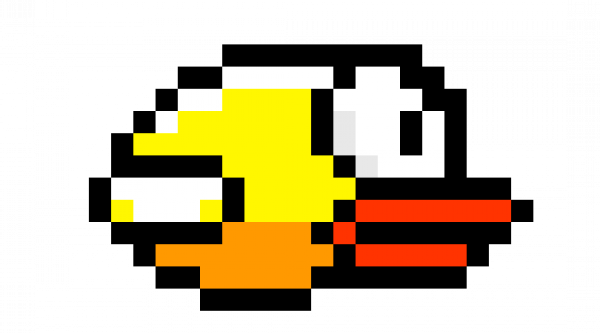
The bird sprite is defined in assets.h as a set of statically initialized arrays that store the pixel color data and
transparency mask for each row of the sprite. The sprite is represented as a 32×16 image, with each row split into two 64-bit values
corresponding to the left and right halves of the sprite. During gameplay, the rendering code in flappy_bird.c reads
these arrays, decodes the color indices, and draws the visible pixels to the VGA framebuffer. A separate mask array is used to skip
transparent pixels, allowing the bird to be drawn cleanly over the background and pipes. This approach keeps sprite data separate
from game logic while allowing efficient, frame-by-frame rendering of the bird on screen.
Audio assets such as scoring, flapping, and collision sounds are stored separately in files like
hit_sound.c, point_sound.c, and flap_sound.c, each containing raw waveform samples.
An AI-generated Python script from ChatGPT was used to convert standard audio files into a format compatible with the digital-to-analog converter.
The script takes a 16-bit PCM .wav file as input and produces a C header file containing preformatted audio samples ready for playback
on the RP2040. When a sound effect is triggered like when the bird passes through a pipe gap or collides with a pipe, the game logic in
flappy_bird.c initiates a DMA transfer that streams the sound data into the DAC through the SPI interface.
Using DMA for sound effects offloads audio playback from the CPU, allowing graphics rendering and game physics to remain responsive even when multiple sounds are triggered during gameplay. Sound effects are also prioritized: important cues such as scoring and collisions can interrupt lower-priority sounds like flapping, ensuring that critical feedback is always heard by the player.
Background MusicIn addition to sound effects, background music plays continuously during gameplay. The music is generated in real time using a timer interrupt and a simple wavetable-based synthesis approach. Notes change at fixed time intervals to form a looping melody that runs independently of the main game loop.
The background music is intentionally quieter than the sound effects so that important gameplay cues remain clear. Because music playback is handled by interrupts, it does not block rendering or input handling, resulting in smooth visuals and consistent audio throughout the game.
Use of AI
We also used AI tools (ChatGPT) as a development assistant to speed up asset generation and reduce repetitive work.
First, ChatGPT helped us convert hand-drawn and online-sourced sprite images (the bird and pipes) into the C lookup tables
and transparency masks stored in assets.h, which made it much easier to iterate on pixel art without manually
encoding hundreds of hex values by hand. In addition, we used ChatGPT to generate a Python script that converts standard
16-bit PCM .wav files into DAC-usable C arrays and header files for our sound effects, allowing us to quickly
try different recordings and keep the audio pipeline consistent with our SPI/DAC format. Importantly, AI was used for
“tooling” and automation rather than core game logic: we still designed and implemented the VGA rendering pipeline,
physics, collision/scoring logic, and concurrency across both RP2040 cores ourselves, and we validated the AI-generated
outputs by testing visual correctness on the VGA display and confirming that audio playback sounded correct and did
not interrupt gameplay.