Project Overview
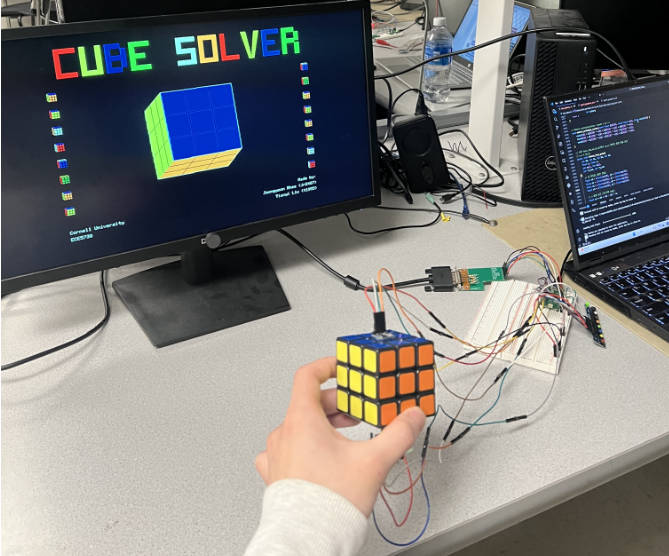
We built an IMU-driven 3D Rubik’s Cube viewer and solver demo on the RP2040, where face colors are entered by buttons and solution steps are computed and replayed on a VGA display.
Project Introduction
In our final project, an IMU-driven 3D Rubik’s Cube viewer and solver demo was built on the RP2040, where face colors were entered by buttons and solution steps were found and shown on a VGA display.
RP2040 dual cores were used to separate IMU processing from VGA rendering, keeping the 3D cube display smooth and stable. IMU data from the MPU6050 and GY271 were sampled at 100Hz and used to update a rotation matrix for real-time cube visualization. A button-based 3×3 color grid for all six faces was implemented with a bottom preview to make color entry clear and reduce input errors. The inputs were converted into a consistent internal cube-state model shared by both the renderer and the solver. An RLFB solution was then found using iterative deepening search and was shown and applied one move at a time, so the solving steps could be followed easily.
High-Level Design
Project Idea
Our inspiration came from Lab 2 and Lab 3. In those labs, the VGA was used to display a digital Galton board, measured angles and control inputs. However, the display content was limited to 2D graphics. This led us to explore whether 3D graphics could be shown on the VGA. When we thought about a 3D cube, it naturally pointed us to a Rubik’s Cube. Therefore, we further decided to build a Rubik’s Cube solver as our final project.
Logical Structure
Two cores were used in our project. Core0 was responsible for running the IMU thread, while Core1 was responsible for running the VGA thread. Core0 signals Core1 via a semaphore to refresh the display using the latest rotation matrix and UI state.
A state machine was used to manage transitions between different cases. In Case 0, an IMU-driven 3D Rubik’s Cube visualization was displayed. In Cases 1–6, the 3×3 grid colors for all six faces were collected one face at a time and previewed at the bottom of the screen. In Case 7, the supported move set, the real-time cube state and the computed solutions were presented.
Hardware/Software Tradeoffs
The solver’s recovery capability was bounded by both sensing constraints and compute limits. To estimate the cube’s 3D pose accurately in real time, we used an IMU (MPU6050) and a magnetometer (GY271). To rigidly mount both sensors on the physical cube while preserving stable axis alignment, we attached one sensor to the top face and the other to the bottom face. This mechanical arrangement introduced a key constraint: we could not perform U (up) or D (down) face rotations during operation, since those moves would disturb the fixed sensor alignment.
Our original plan was to solve the cube using Kociemba’s two-phase algorithm; however, the restriction on U/D moves meant that a standard full-move solution pipeline was not applicable. As a result, we adopted a brute-force search approach using Iterative Deepening Depth-First Search (IDDFS) over the remaining four faces. Because the RP2040 has limited computational resources, we bounded the search to solutions within a finite number of moves to avoid excessively long runtime. Increasing the maximum search depth expands solvable configurations, but runtime grows rapidly with depth.
Relevant Patents/Copyrights/Trademarks
This project did not incorporate any patented technology, third-party intellectual property, or registered trademarks.