WiFi Bike Nav — Final Report
A bike computer which displays my location on a map using WiFi signals to determine position using a RPi Pico W
Introduction
The rationale for this project was three-fold:
- I like riding my bike around campus,
- There are a lot of eduroam WiFi routers on campus.
- Using only WiFi to determine position seemed like a fun constraint.
Using a Raspberry Pi Pico W, a small Adafruit TFT display and a Hall effect sensor I was able to create a bike computer which could display the user's position on a map of Cornell's campus. By collecting data associating WiFi AP MAC addresses and signal strengths with physical locations and then processing and loading this information onto the Pico, the Pico could then determine its position by scanning its surrounding WiFi environment and comparing the nearby MAC addresses to those already in it's dataset. If it can determine its position, it will render the device's estimated location atop a corresponding map tile containing nearby buildings and roads, also loaded onto the Pico beforehand (covering a roughly $0.75 \text{mi}^2$ area of campus). I also attached a Hall effect sensor to the Pico, which when coupled with a permanent magnet secured the front wheel's spokes provided speed and distance measurements by recording the time of each wheel revolution.
Design
The main reasons for building this project were above, but I should note that I realised the WiFi constraint might be feasible after seeing this HN post about a startup building highly accurate indoor GPS using only WiFi. I also was aware that Google and Apple used similar techniques for locating users in denser environments.
Preamble over, how did this project actually come to fruition?
1. Data Collection and Processing
Collecting and processing WiFi AP data was the crux of this project and occupied a significant portion of the 4 week time frame. The approach I took was to collect:
- GPS (true) location (LOC)
- AP MAC addresses at that location (MAC)
- Associated signal strengths of each MAC address at that location (RSSI)
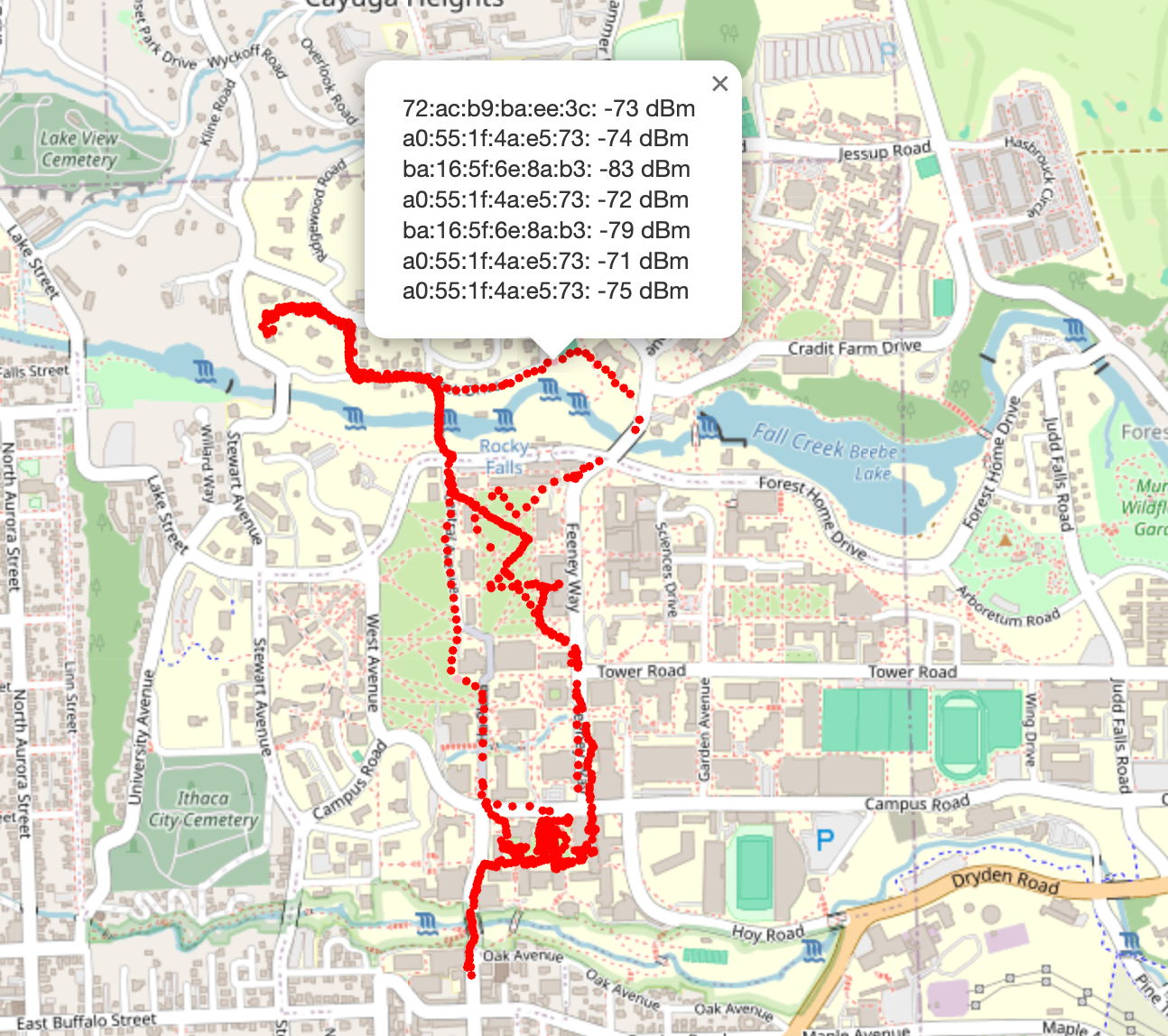
The RPi Pico examples repository contained an example C program which, with some minor tweaks, was able to collect multiple (MAC, RSSI) pairs at 5 second intervals. It output this via serial and so, with my laptop hooked up via a Debug probe, I could record and save this data via a Python script which did some minor manipulation and output these (MAC, RSSI) pairs along with a timestamp to an scans.ndjson file (each newline is an individual JSON object). Great! We've got 2 and 3, now for location. Rather frustratingly, I wasted a significant amount of time trying to find a way to get the current position. I tried various approaches to programmatically read my iPhone GPS (quite difficult, unsurprisingly) and read an old Android phone's GPS (straightforward but had a low accuracy ~30-90m) before remembering that whenever I use Strava to track my runs, my location is always super accurate. Even better, Strava lets you download any recorded route as a GPX file in their web app, an XML file format, which in Strava's case contains... timestamps and locations! Using the recorded timestamps from the scans.ndjson, we can associate 1, 2 and 3. Now all that's needed is to walk around campus, with a laptop recording the Pico's WiFi scans, and a Strava activity recording on my phone. What does this look like?
Okay great, now what? We probably shouldn't call it a day here and just use these raw data points — It's quite wasteful in areas where there is a high density of data points, and with only 2MB of flash, making efficient use of this space is important. It would also waste compute, as there would be an overabundance of matches for a given scan. Three unique approaches were taken, with each improving on the drawbacks of the last. I will discuss each briefly here (for a more developed discussion see [Section...])
1. AP Position LSE
This approach used a least squares model to try and estimate the longitue and latitude of the APs, taking the RSSI measurements at various positions as a relative measure of distance, and attempting to minimise the distance error from each data point to determine AP position.
Locating approach: LSE of current location by minizing error between pre-computed AP "positions" and their relative distances from the Pico (as determined by measured RSSIs)
- Pros
- Better performance at locations further from the dataset
- Cons
- Needs data points in an orbit around an AP to accurately obtain its position.
- Amplifies noise: different SSIDs often eminate from the same physical AP (e.g. RedRover, Cornell-Visitor & eduroam), so noise in picking up these signals is amplified
- Assumes signal strength decay is uniform for all data points
2. Grid Snapping
This approach divided up the chosen area of Cornell's campus (See Figure 1, which shows the approximate span) into a 10x10 grid. If 3 or more datapoints were within 10m of the vertex, the vertex would take a weighted average of the datapoints to determine the values of the (MAC, RSSI) pairs at that location.
Locating approach: Weighted average of "most similar" vertices based on the difference between the Pico's measured (MAC, RSSI) pairs and the (MAC, RSSI pairs at the data points)
- Pros
- Less drift as the grid points are closer to the true dataset
- Grid layout makes position estimation faster and simpler to implement
- Cons
- Amplifies noise: Measured signal strength, in testing, did not have enough variation between adjacent vertices to be very accurate
3. Path Snapping ⭐️
This was the epiphany moment, where I realised that 99% of the time I would be cycling along roads or footpaths. Why have my dataset contain a series of vertices I will never be at, and introduce unneccessary error. If I could map my raw data points (collected along paths) to a systematic, evenly distribution series of points along known paths and roads in Ithaca (at, say 10m intervals), this would make the estimated position much more likely to be correct.
Locating approach: Find the "most similar" point in the dataset, based on the dataset point's similarity of the measured (MAP, RSSI) pairs
- Pros
- Location will be more likely to be correct (always on a road)
- Position esimation is fast and easy implement
- Existing data points are already "along paths"
- Cons
- Only works along pre-mapped paths, has no support for off-piste travel
import matplotlib.pyplot as plt
import json
import os
import contextily as ctx
import numpy as np

fig, axs = plt.subplots(1, 3, figsize=(16, 6))

with open("data/ap_location_lse.json", "r") as f:
  pts = json.loads(f.read())["aps"].values()
  xs = [pt["location"][1] for pt in pts]
  ys = [pt["location"][0] for pt in pts]

  axs[0].scatter(xs, ys, s=10, color="red", zorder=2)
  ctx.add_basemap(axs[0], crs="EPSG:4326", source=ctx.providers.OpenStreetMap.Mapnik)
  axs[0].set_title("1. AP Location LSE")

with open("data/ap_to_grid_points.ndjson", "r") as f:
  pts = [json.loads(a) for a in f.readlines()]
  xs = [pt["lon"] for pt in pts]
  ys = [pt["lat"] for pt in pts]


  axs[1].scatter(xs, ys, s=10, color="red")
  ctx.add_basemap(axs[1], crs="EPSG:4326", source=ctx.providers.OpenStreetMap.Mapnik)
  axs[1].set_title("2. Grid Snapping")

with open("data/location_grid.ndjson", "r") as f:
  pts = [json.loads(a) for a in f.readlines()]
  xs = [pt["lon"] for pt in pts]
  ys = [pt["lat"] for pt in pts]


  axs[2].scatter(xs, ys, s=10, color="red")
  ctx.add_basemap(axs[2], crs="EPSG:4326", source=ctx.providers.OpenStreetMap.Mapnik)
  axs[2].set_title("3. Path Snapping")

fig.suptitle("Figure 2: Progression of Location Data Encoding")
plt.plot()
plt.show()

In order to create the Path Snapping dataset, I first downloaded an OSM file over my chosen area of Cornell's campus (42.441416, -76.49076 to 42.45791, -76.47356) and then used the pyrosm library to extract all the walking paths in the area. I then added up all the lengths of the paths to get the total length of the paths in the area, and then iterated over the total distance, adding points at 10m intervals, and interpolating across the corresponding path segement at the appropriate point.
Once I had these points, I iterated over each and if there were more than 3 recorded points within 10m of it, I would take a weighted average of the points to determine the values of the (MAC, RSSI) pairs at that location.
2. On-Pico Computation
After settling on the Path Snapping approach, the next stage was to encode this data onto the Pico in space and computationally efficient way. I decided to transform the data into 2 separate arrays:
- A
chararray of known MAC addresses
const char* ap_macs[670] = {
  "00:1d:b3:af:b2:1a",
  "00:31:44:68:f8:9e",
  // ...
}
- A 3D array containing locations where that AP was detected and its corresponding signal strength at that position
const int ap_locations[670][38][3] = {
  {
    {461.546, 354.023, -73.0},
    {474.337, 357.28, -73.726},
    {447.629, 311.343, -78.0},       // Corresponds to MAC: 00:1d:b3:af:b2:1a
    {452.272, 325.572, -78.647},
    {444.756, 296.651, -81.0}
  },
  {
    {446.363, 266.938, -59.758}
  },
  // ...
}
It is worth noting that instead of using longitude and latitude as measurements of position, I opted for a relative approach spanning 0-1411m in the x direction and 0-1880m in the y direction, as the intended area of this device was small. Furthermore, this made handling the positions easier when it came to map tiling and other computations (no negative numbers for instance).
To enhance lookups, I used a hashmap library to map the MAC addresses to a corresponding pointer in the ap_macs array. This allowed for O(1) lookups, which in hindsight might have been overkill, but had the number of stored MAC addresses been much larger, it would have been an important improvement.
2.1 Where Am I?
Okay, so we've got all the pieces for locating the Pico, how do we actually do it?
static async_at_time_worker_t scan_worker = {.do_work = scan_worker_fn};
hard_assert(async_context_add_at_time_worker_in_ms(cyw43_arch_async_context(), &scan_worker, 4000));
Firstly, we setup a worker to trigger the scan_worker_fn function every 4 seconds.
typedef struct Candidate
{
    struct Pos pos;
    float error;
    int matches;
} Candidate;

volatile Candidate loc = {.pos = {0, 0}, .error = 0.0f, .matches = 0};
volatile Candidate prev_locs[10] = {};
int prev_loc_count = 0;

hashmap *aps;

int PTS_PER_AP = 38;

volatile int num_scans;

Candidate candidates_arr[100];
int num_candidates = 0;

static int scan_result(void *env, const cyw43_ev_scan_result_t *result)
{
    char mac_str[18];
    float rssi;

    if (result)
    {
        // Takes scan result and formats it into a MAC address string and RSSI value
        snprintf(mac_str, sizeof(mac_str), "%02x:%02x:%02x:%02x:%02x:%02x",
                 result->bssid[0], result->bssid[1], result->bssid[2],
                 result->bssid[3], result->bssid[4], result->bssid[5]);
        rssi = result->rssi;

        printf("ssid: %-32s rssi: %4d chan: %3d mac: %02x:%02x:%02x:%02x:%02x:%02x sec: %u\n",
               result->ssid, result->rssi, result->channel,
               result->bssid[0], result->bssid[1], result->bssid[2], result->bssid[3], result->bssid[4], result->bssid[5],
               result->auth_mode);

        uintptr_t locations_ptr;

        // Looks up the MAC address in the hashmap
        if (hashmap_get(aps, mac_str, 18, &locations_ptr))
        {
            int (*pts)[3] = (int (*)[3])locations_ptr;

            // Iterates over the locations of the AP
            for (int i = 0; i < PTS_PER_AP; i++)
            {

                float pt_rssi = pts[i][2];

                // Exceeded array
                if (pt_rssi == 0)
                    break;

                struct Pos pos = {pts[i][0], pts[i][1]};

                // Weight by signal strength difference
                float error = fabs(rssi - pt_rssi);
                struct Candidate candidate = {
                    .pos = pos,
                    .error = error,
                    .matches = 1,
                };

                // Adds candidate to candidates_arr (this helper function, which upserts, incrementing the number of matches and recomputing the average error)
                add_candidate(&candidate);
            }

            num_scans++;

            // Computes best candidate out of all the candidates
            loc = find_best_candidate();
        }
    }

    return 0;
}
This is a long function, but it's not too bad. We define a Candidate struct, which contains a Pos struct, an error value and a number of matches. We also define a loc variable, which will store the best candidate out of all the candidates.
We then define a scan_result function, which takes a scan result and formats it into a MAC address string and RSSI value. We then look up the MAC address in the hashmap and obtain a pointer to the locations array.
We then iterate over the locations of the AP, compute the error between the measured RSSI and the RSSI at the location, and add the candidate to the candidates_arr array.
float dist_travelled_between_pts = 0;

static Candidate find_best_candidate()
{
    if (num_candidates == 0)
    {
        return prev_locs[prev_loc_count];
    }
    Candidate best_candidate = prev_locs[prev_loc_count];
    for (int i = 0; i < num_candidates; i++)
    {
        if (dist_travelled_between_pts > 0 && prev_loc_count > 0 && !DEMO_MODE)
        {
            float dist = sqrtf(powf((candidates_arr[i].pos.x - prev_locs[prev_loc_count].pos.x), 2) +
                               powf((candidates_arr[i].pos.y - prev_locs[prev_loc_count].pos.y), 2));
            // If the candidate is too far from the previous location, skip it
            if (dist > dist_travelled_between_pts * 1.2f)
            {
                continue;
            }
        }
        if (candidates_arr[i].matches > best_candidate.matches)
        {
            best_candidate = candidates_arr[i];
        }
        else if (candidates_arr[i].matches == best_candidate.matches)
        {
            if (candidates_arr[i].error < best_candidate.error)
            {
                best_candidate = candidates_arr[i];
            }
        }
    }
    return best_candidate;
}
Finally, to find the best candidate, we iterate over all the candidates in the find_best_candidate function, identifying the best one as follows:
- If there are no candidates, return the previous location
- If the candidate is too far from the previous location (given the esimated distance travelled (discussed later)) skip it
- The candidate with the most matches is the best candidate
- If there is a tie, the candidate with the least error is the best candidate
This approach allows for easy upgrades to the location estimation if new sensors are added — if I were to add a compass, I could use directionality to exclude candidates which don't match the heading from the previous location.
3. Displaying the Map (& other hardware)
Right now, the Pico knows where it is, but can't do anything with that information. To display the Pico's location on a map and actually provide information to the user, I used a 240x360 2.2in Adafruit TFT display (ILI9341), and the excellent TFT Library adapted by Parths Sharma from Syed Tahmid Mahbub's PIC32 driver. The display was connected via SPI as shown in the image below, using the default GPIO pins expected by the driver.
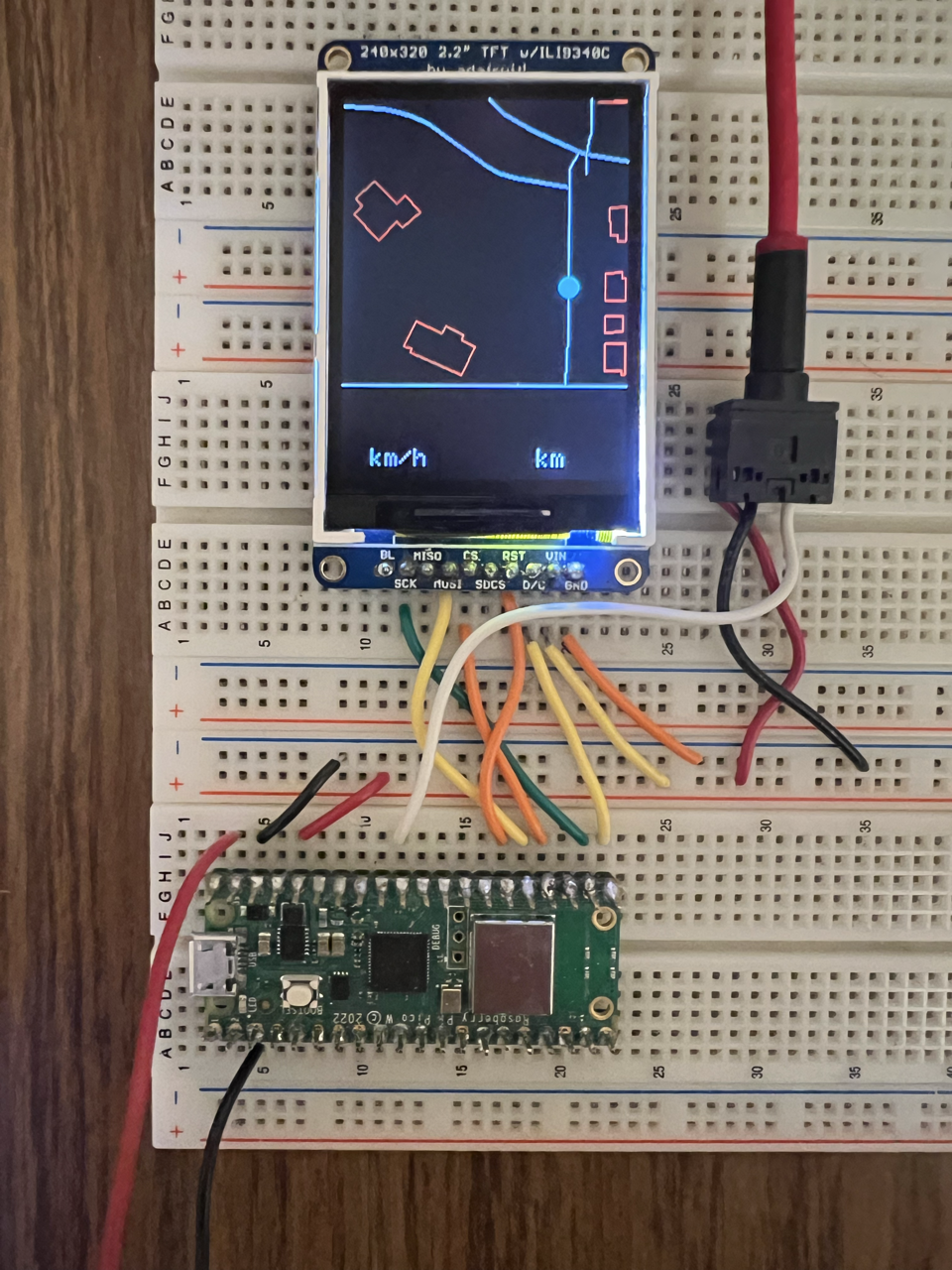
I decided to use a map tiling approach, dividing up my chosen area into a grid of 120x120m tiles, and loading these map tiles into the Pico's flash memory. This provides a resolution of 2 pixels per meter, which though small, is perfectly usable on a bike. As seen in the above image, the display is not square and as such we get 240x120 pixels at the bottom of the display which we can use to display other information.
3.1 Map Tiling
In the same way that we extracted the walking paths from the OSM file to create the Path Snapping dataset, we can use this same data to create a series of map tiles. Most common map applications use images for their tiles, but given the significant space constraints on the Pico, I decided to tile with lines and polygons instead.
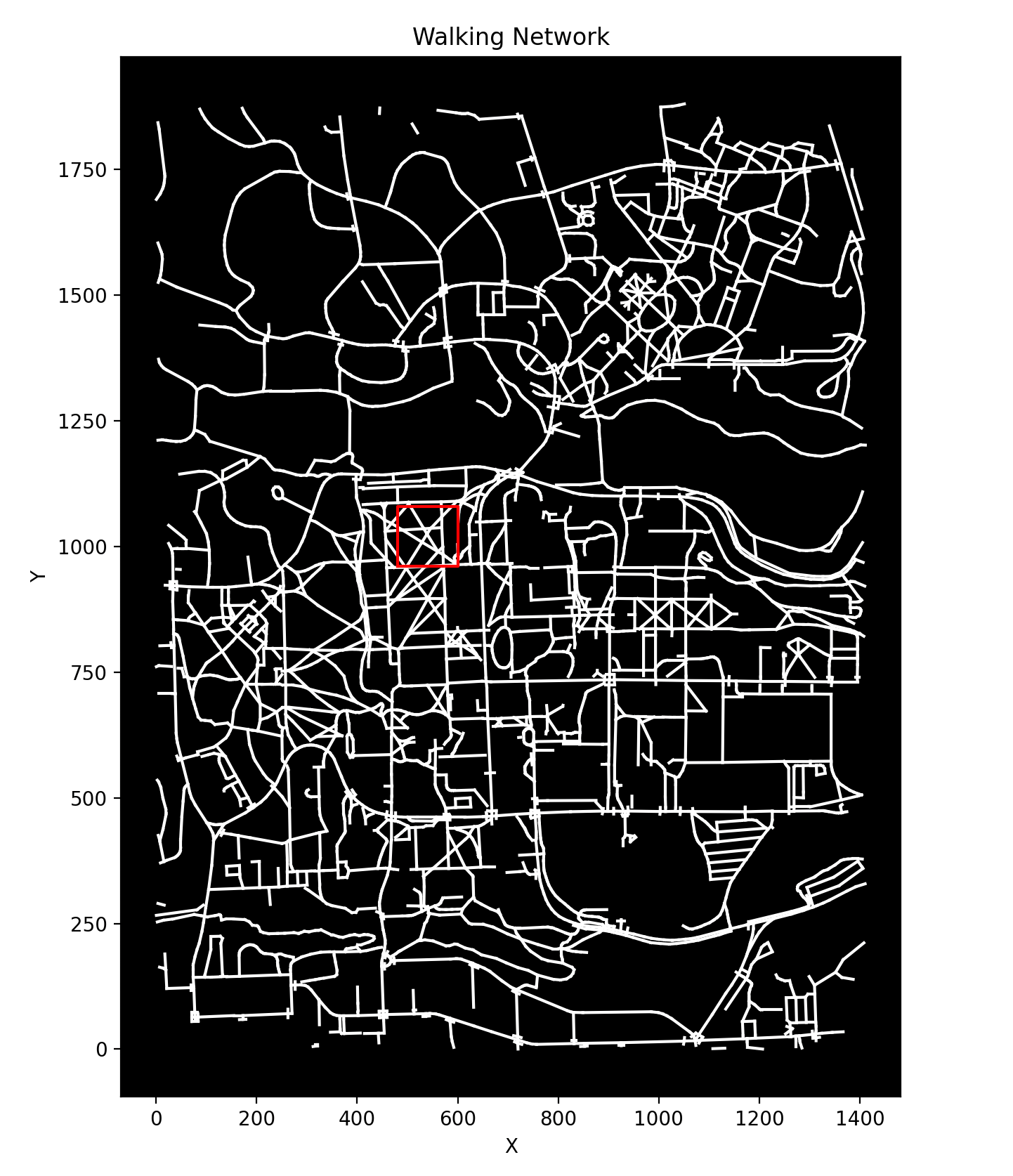
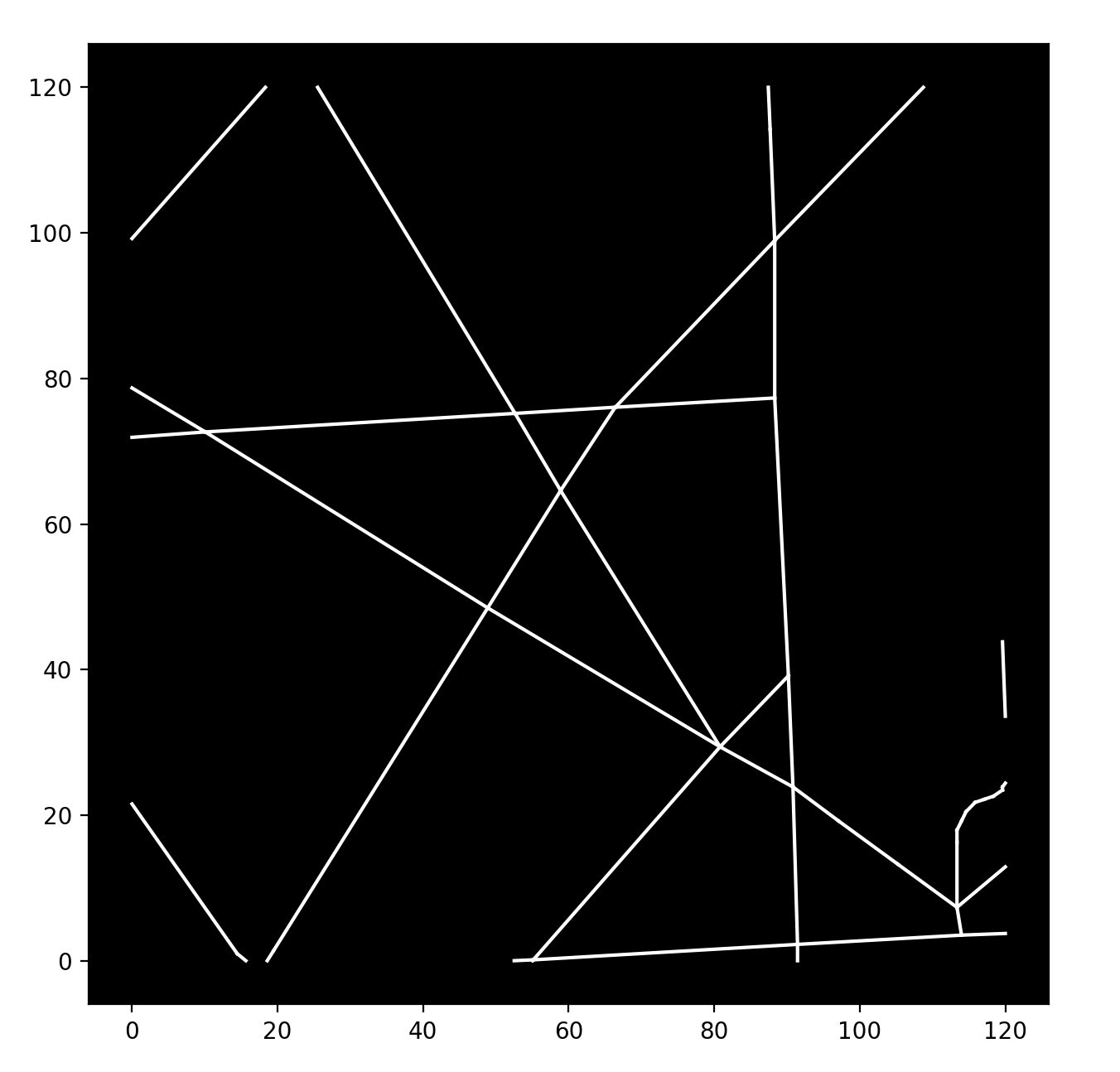
Significant data manipulation was required to convert the OSM data into a format which could be usable for map tiling. The problem of taking a series of line start and endpoints and determining all the lines or subsections of lines which lie within a given bounding box is non-trivial. Fortunately, there are libraries which can do a lot of this heavy lifting. The shapely packaged provided routines for computing these intersectionss, so I wrote a Python script to iterate over the chosen 1880x1411 area and create a 4D array of: tiles > segments > start/end points > coordinates.
Before loading onto the Pico, I rounded the coordinates down to 1 decimal place to reduce the storage footprint and wrote a script to convert and write the Python array to a C file. The approximate size of the walking route tiles was 200KB, so we still had a fair amount of space left.
A similar process was used to tile building polygons, which were also pacakged into a series of line segments corresponding to different map tiles, producing a 4D array of: tiles > segments > start/end points > coordinates, totaling 240KB.

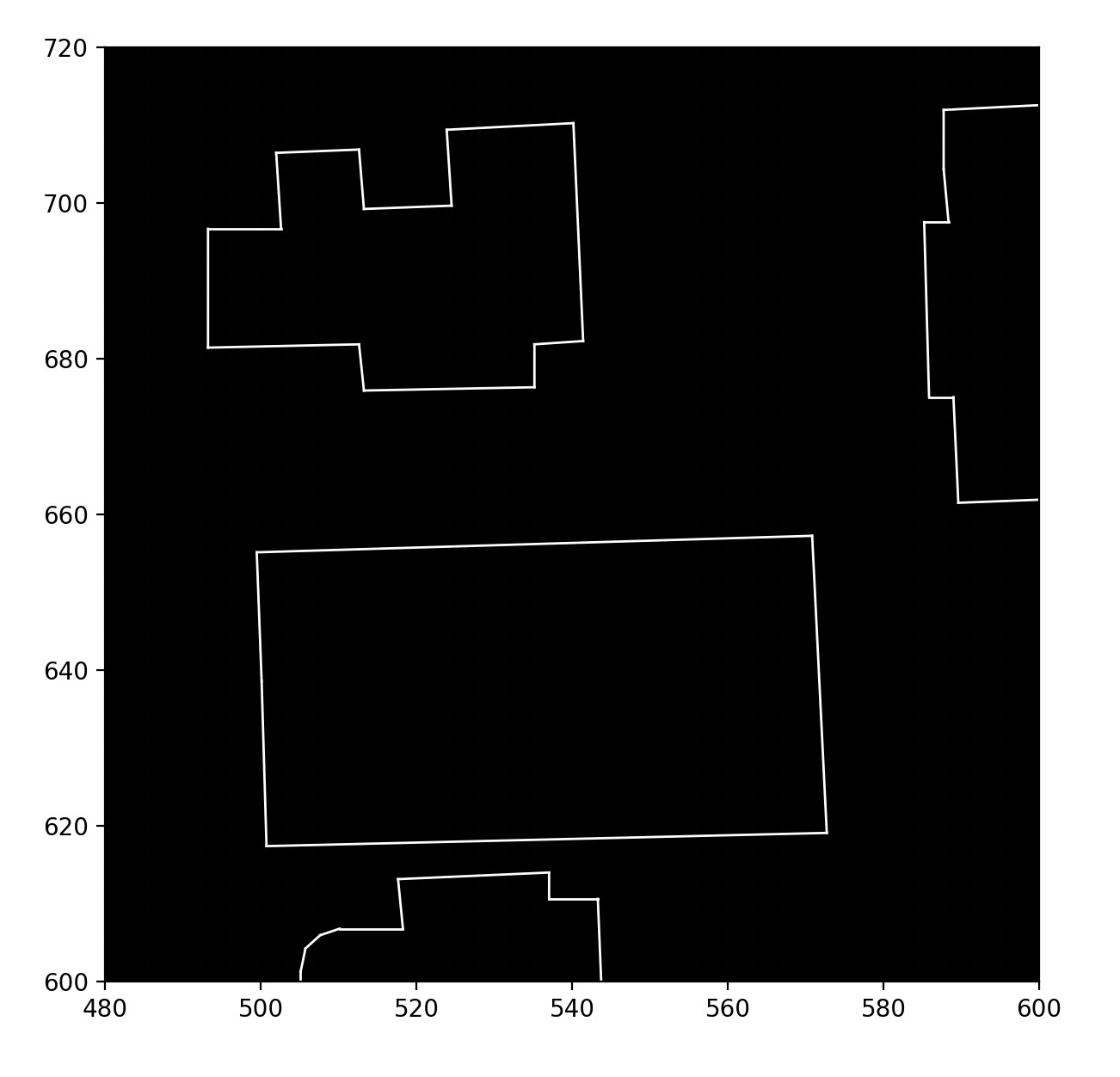
Here's a snippet of what the map tiles look like in C. A map tile with bottom corner (x, y) corresponds to index $(x / 120) + 12(y / 120)$ in the map_paths and map_buildings arrays.
// data.h

const short map_paths[192][108][2][2] = {
    {
        {{71.3, 63.4}, {77.6, 63.8}},
        {{77.6, 63.8}, {77.6, 55.4}},
        {{75.2, 120.0}, {76.9, 72.7}},
    }
    ...
};

const float map_buildings[192][217][2][2] = {
  {
    {{119, 42.7}, {119, 28.7}},
    {{119, 28.7}, {117.0, 28.6}},
    {{117.0, 28.6}, {117.0, 42.6}},
    ...
  }
  ...
};

...
Rendering the map was done in the display_thread which waits on a semaphore to trigger when a new AP is discovered (and the current position is recomputed).
static PT_THREAD(display_thread(struct pt *pt))
{
    PT_BEGIN(pt);

    // Boot screen
    tft_setCursor(10, 140);
    tft_setTextColor(ILI9340_WHITE);
    tft_setTextSize(4);
    tft_writeString("Bi-Fi Nav");
    tft_setCursor(10, 180);
    tft_setTextSize(2);
    tft_writeString("Scanning for APs...");
    tft_setCursor(10, 220);
    tft_setTextSize(2);
    tft_writeString("By Wyatt Sell");

    while (1)
    {
        // Semaphore triggered when a new AP is discovered (and the current position is recomputed)
        PT_SEM_WAIT(pt, &sem_display);

        tile_idx = (loc.pos.x / 120) + (loc.pos.y / 120 * TILES_X);

        // Clear the screen
        tft_fillRect(0, 0, 240, 240, ILI9340_BLACK);
        tft_drawFastHLine(0, 241, 240, ILI9340_WHITE);

        // Add distance units
        tft_setTextColor(ILI9340_WHITE);
        tft_setCursor(25, 295);
        tft_setTextSize(2);
        tft_writeString("km/h");

        tft_setCursor(165, 295);
        tft_setTextSize(2);
        tft_writeString("km");

        // Draw the paths
        for (int i = 0; i < 108; i++)
        {
            if (map_paths[tile_idx][i][0][0] == 0 && map_paths[tile_idx][i][0][1] == 0 &&
                map_paths[tile_idx][i][1][0] == 0 && map_paths[tile_idx][i][1][1] == 0)
            {
                break;
            }
            // Subtract y coordinates from 240 to flip the y-axis (accounts for screen origin being top left)
            tft_drawLine(map_paths[tile_idx][i][0][0] * 2, 240 - (map_paths[tile_idx][i][0][1] * 2), map_paths[tile_idx][i][1][0] * 2, 240 - (map_paths[tile_idx][i][1][1] * 2), ILI9340_WHITE);
        }

        // Draw the buildings
        for (int i = 0; i < 217; i++)
        {
            if (map_buildings[tile_idx][i][0][0] == 0 && map_buildings[tile_idx][i][0][1] == 0 &&
                map_buildings[tile_idx][i][1][0] == 0 && map_buildings[tile_idx][i][1][1] == 0)
            {
                break;
            }
            tft_drawLine(map_buildings[tile_idx][i][0][0] * 2, 240 - (map_buildings[tile_idx][i][0][1] * 2), map_buildings[tile_idx][i][1][0] * 2, 240 - (map_buildings[tile_idx][i][1][1] * 2), ILI9340_RED);
        }

        // Draw the current position
        tft_fillCircle((loc.pos.x % 120) * 2, 240 - ((loc.pos.y % 120) * 2), 8, ILI9340_CYAN);
    }

    PT_END(pt);
}
3.2 Hall Effect Sensor
In order to obtain a rough estimate of the speed of the bike, I used a hall effect sensor. This is a simple sensor which detects magnetic field changes and it creates a voltage spike which can be read using the Pico's ADC. By fixing a magnet to the spokes on the front bike wheel, I could use the hall effect sensor to detect the speed of revolution and hence the speed of the bike.

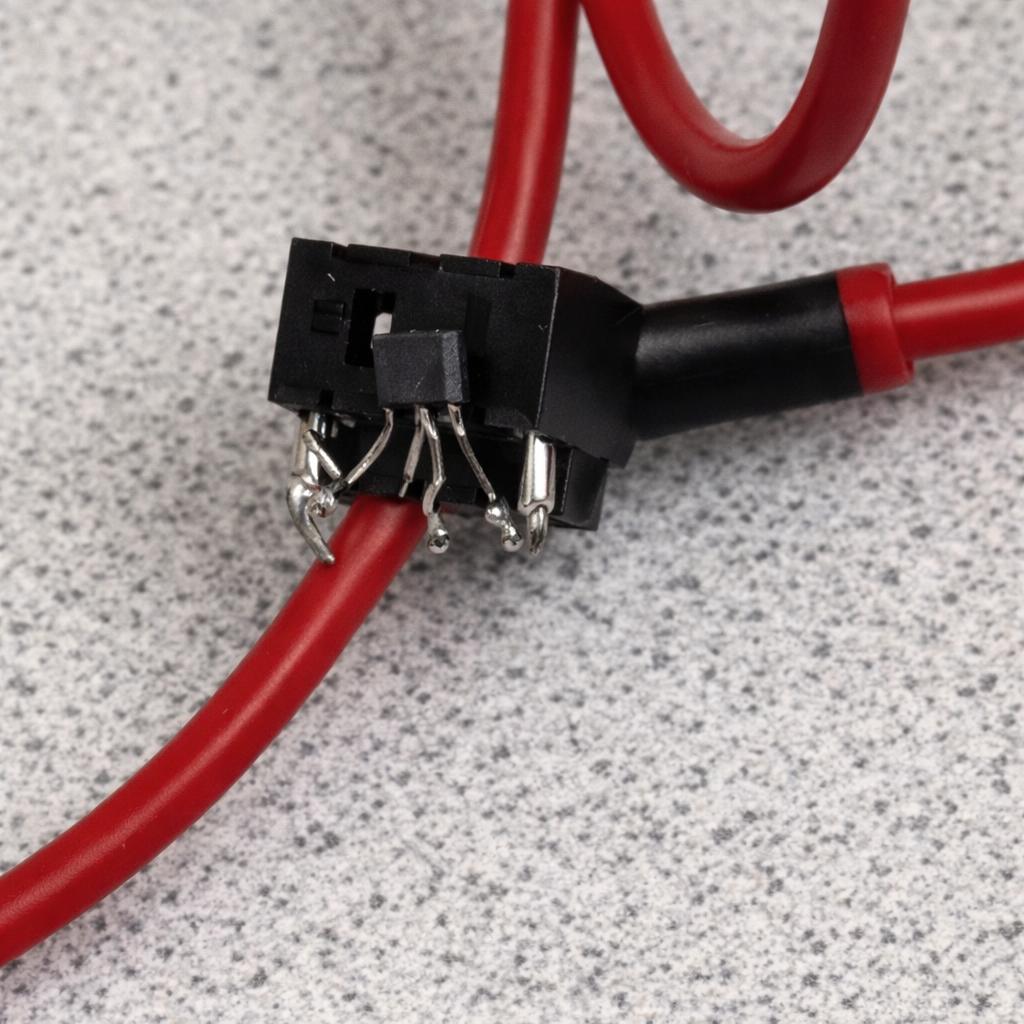
As noted in Figure 9, I used a 3.5mm headphone jack to interface with the hall effect sensor. Given that a 3.5mm jack has 3 pins, I figured that I could use these 3 pins, along with 2 female jacks and an audio cable to create a simple, easily detachable setup. The pictured end would be affixed to the front fork of the bike, and this proved effective during testing. In Figure 3, you can see the other end of the audio cable connected to the Pico via GPIO 26 (ADC 0). Below is the code which reads the hall effect sensor and updates the speed display. As mentioned earlier, this data was used to improve the accuracy of the location estimation by providing a value for the distance travelled.
This runs on a separate core to the scan_worker and display_worker to enable such a high poll rate without introducing issues with the other threads.
int rotation_time = 0; // Duration of revolution in ms
float speed_m_s = 0; // Speed in m/s
float speed_kmh = 0; // Speed in km/h
float prev_speed_kmh = 0; // Previous speed in km/h

int in_low_region = 0; // Is magnet close to the sensor?

static PT_THREAD(speedometer_thread(struct pt *pt))
{
    PT_BEGIN(pt);

    static const float wheel_circumference_m = 2.105f; // 700x38c in meters

    while (1)
    {
        u_int16_t current_adc = adc_read();

        // Magnet is close to the sensor
        if (current_adc < 100 && !in_low_region)
        {
            in_low_region = 1;
            speed_m_s = rotation_time > 0 ? wheel_circumference_m / (rotation_time / 1000.0f) : 0.0f;
            speed_kmh = min(speed_m_s * 3.6f, 90);
            distance += wheel_circumference_m / 1000.0f; // in km
            // Add distance to TFT
            tft_setCursor(150, 265);
            tft_setTextSize(3);
            char distance_str[15];
            snprintf(distance_str, sizeof(distance_str), "%.2f", distance);
            tft_writeString(distance_str);

            rotation_time = 0;
        }
        else
        {
            rotation_time += 1;
        }

        // If voltage is high now, magnet is not close
        if (in_low_region && current_adc >= 100)
        {
            in_low_region = 0;
        }

        // If no magnet is detected for 4 seconds, wheel has stopped
        if (rotation_time > 4000)
        {
            speed_kmh = 0.0f;
            rotation_time = 0;
        }

        // Update display if speed has changed
        if (fabs(speed_kmh - prev_speed_kmh) > 0.1f)
        {
            char speed_str[10];
            snprintf(speed_str, sizeof(speed_str), "%.2f ", speed_kmh);

            tft_setTextColor2(ILI9340_WHITE, ILI9340_BLACK);
            tft_setCursor(15, 265);
            tft_setTextSize(3);
            tft_writeString(speed_str);
        }

        prev_speed_kmh = speed_kmh;

        // Poll every 1ms
        PT_YIELD_usec(1000);
    }

    PT_END(pt);
}
3.3 Battery
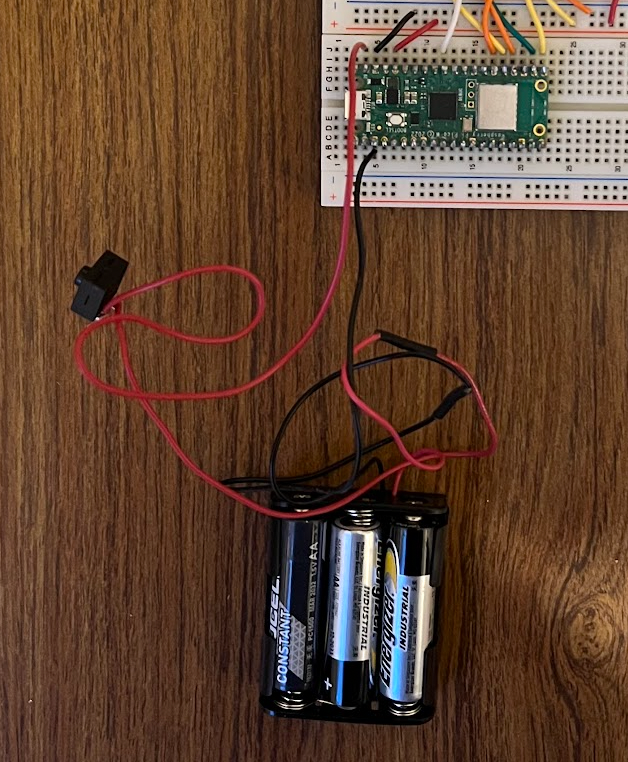
I also attached a battery to the Pico to prototype use of the device on a bike where hardwired power is not practical. I used an off-the-shelf battery holder and a 3xAA battery pack, and soldered a switch along the positive wire to allow for turning the Pico on and off. The black wire is connected to the Pico's ground, and the positive wire is connected to the Pico's VSYS pin.
AI Use
AI Use throughout this project was specific and minimal:
- Code automcomplete in VSCode was used occasionally if suggested code was appropraite
- At points where I was struggling with specific data structures and methods in unfamiliar libraries, I give Copilot a specific request with prompts similar to the following:
- "I have a collection of Polygon objects from pyorsm inside a panda Dataframe and I want to convert them to a 2D array of line segments"
- "Nothing is showing up when I attempt to plot these line segments, what am I doing wrong?"
- When developing the unused LSE algorith, I asked ChatGPT for suggestions on how to create such a model using a relativistic measure of distance (RSSI).
Results
Providing a quantitative evaluation of the Pico's performance is tricky, but I've included both the demo video and a map of a test run with the true path and the Pico's estimated path.
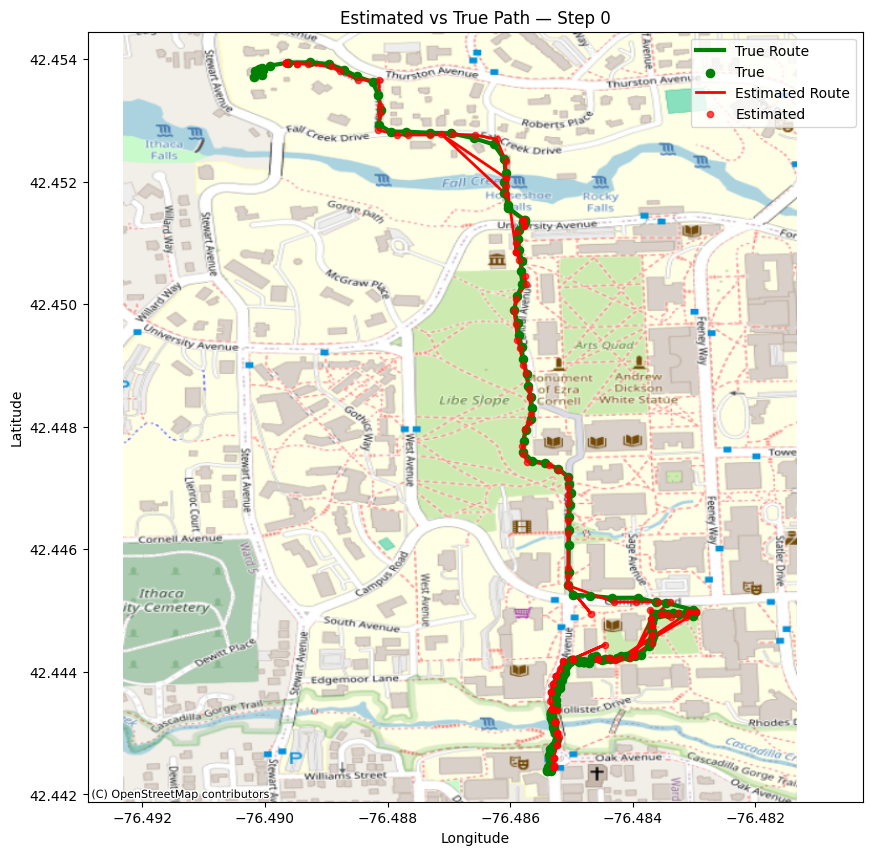
Overall performance is strong, with some artefacting when crossing the suspension bridge, a result of fewer APs being visible to effectively triangulate.
Safety
By keeping the map simple, font's large and batteries (more) safe (AA instead of LiPo) I made sure that this would be a relatively safe device to use on a bike.
Usability
The usability of this device can be seen in two ways:
- The map and text displays clearly and no user input is required for the device to function — Good usability
- The device is not in a compact package, cannot be easily mounted to a bike, and has not been tested in the field yet — Poor usability
Conclusion
Overall, I consider this project a success and I achieved nearly all of my initial goals. The development process was surprisingly smooth, and my Python scripts made iterating on location estimation algorithms, map generation and AP datasets very efficient. I was particularly happy with a webserver I created to view the location data, and my processing of it. In the demo video, the Pico, using only precollected WiFi scans, manages to correctly display the users location from the Suspension Bridge to Collegetown via the Engineering Quad, a distance of about 1 mile.
Major features:
- Accurate location estimation from WiFi alone
- Displayed map of Cornell's campus
- Speedometer / Distance reading
Improvements:
- I wish I could have included a magnetometer to improve the accuracy of the location estimation
- A 3D printed enclosure and mount would have made the project usable on a bike.
- More data collection would have allowed for better coverage across campus, as well as the ability to create testing data sets to iterate on the location estimation algorithm.
- Integrated scanning which would store WiFi scans, possibly uploading them to a server when the Pico is nearby a known AP, so that the user could collect new APs (while presumably running a Strava track on their phone), and then use this data to improve the dataset. Right now a reflash is the only way to toggle between scanning and locating modes.
- LiPi battery and charger would be a nicer (and lighter) solution than the current 3xAA setup.
IP Considerations
There was a significant amount of open-soure code used in this project (e.g. a great deal of Python libraries), but I will point out the most significant.
- TFT library: MIT License
- pyrosm: MIT License
- hashmap: MIT License
- shapely: BSD 3-Clause License
- Pico SDK: BSD 3-Clause License
- Pico Examples: BSD 3-Clause License
Appendix
Appendix A
I approve this report for inclusion on the course website.
I approve the video for inclusion on the course youtube channel.
Appendix B
// picow_wifi_scan.c

#include <stdio.h>
#include <math.h>
#include <stdint.h>

#include "pico/stdlib.h"
#include "pico/cyw43_arch.h"
#include "hardware/vreg.h"
#include "hardware/clocks.h"
#include "hardware/rtc.h"
#include "pico/util/datetime.h"
#include "pt_cornell_rp2040_v1_4.h"
#include "pico/multicore.h"

#include "hardware/gpio.h"
#include "hardware/irq.h"
#include "hardware/pwm.h"
#include "hardware/pio.h"
#include "hardware/i2c.h"
#include "hardware/adc.h"

#include "TFTMaster.h" //The TFT Master library

#include "map.h" // Hashmap library
#include "data.h" // WiFi location and map data

#define DEMO_MODE 0
#define SCAN_MODE 0

#define max(a, b) (((a) > (b)) ? (a) : (b))
#define min(a, b) (((a) < (b)) ? (a) : (b))
#define pos(a) a[0], a[1]

// Constants
#define MAX_X 1411
#define MAX_Y 1880
#define TILES_X 12
#define TILES_Y 16
#define PTS_PER_AP 38

static struct pt_sem sem_display;

// Location structs and variables
typedef struct Pos
{
    int x;
    int y;
} Pos;

typedef struct Candidate
{
    struct Pos pos;
    float error;
    int matches;
} Candidate;

volatile Candidate loc = {.pos = {550, 895}, .error = 0.0f, .matches = 0};
volatile Candidate prev_locs[10] = {};
int prev_loc_count = 0;

hashmap *aps;
volatile int num_scans;

Candidate candidates_arr[100];
int num_candidates = 0;


static int add_candidate(const Candidate *c)
{
    for (int i = 0; i < num_candidates; i++)
    {
        // If duplicate candidate, update matches and error
        if (candidates_arr[i].pos.x == c->pos.x && candidates_arr[i].pos.y == c->pos.y)
        {
            candidates_arr[i].matches += c->matches;
            if (c->error < candidates_arr[i].error)
            {
                candidates_arr[i].error = c->error + candidates_arr[i].error / candidates_arr[i].matches;
            }

            return 0;
        }
    }

    candidates_arr[num_candidates] = *c;
    num_candidates++;
    return 0;
}

float dist_travelled_between_pts = 0;

static Candidate find_best_candidate()
{
    if (num_candidates == 0)
    {
        return prev_locs[prev_loc_count];
    }
    Candidate best_candidate = prev_locs[prev_loc_count];
    for (int i = 0; i < num_candidates; i++)
    {
        if (dist_travelled_between_pts > 0 && prev_loc_count > 0 && !DEMO_MODE)
        {
            float dist = sqrtf(powf((candidates_arr[i].pos.x - prev_locs[prev_loc_count].pos.x), 2) +
                               powf((candidates_arr[i].pos.y - prev_locs[prev_loc_count].pos.y), 2));
            // If the candidate is too far from the previous location, skip it
            if (dist > dist_travelled_between_pts * 1.2f)
            {
                continue;
            }
        }
        if (candidates_arr[i].matches > best_candidate.matches)
        {
            best_candidate = candidates_arr[i];
        }
        else if (candidates_arr[i].matches == best_candidate.matches)
        {
            if (candidates_arr[i].error < best_candidate.error)
            {
                best_candidate = candidates_arr[i];
            }
        }
    }
    return best_candidate;
}

static int scan_result(void *env, const cyw43_ev_scan_result_t *result)
{
    char mac_str[18];
    float rssi;

    if (result)
    {
        snprintf(mac_str, sizeof(mac_str), "%02x:%02x:%02x:%02x:%02x:%02x",
                 result->bssid[0], result->bssid[1], result->bssid[2],
                 result->bssid[3], result->bssid[4], result->bssid[5]);
        rssi = result->rssi;

        if (SCAN_MODE) {
          printf("ssid: %-32s rssi: %4d chan: %3d mac: %02x:%02x:%02x:%02x:%02x:%02x sec: %u\n",
                result->ssid, result->rssi, result->channel,
                result->bssid[0], result->bssid[1], result->bssid[2], result->bssid[3], result->bssid[4], result->bssid[5],
                result->auth_mode);
        }

        uintptr_t locations_ptr;
        // Get the locations for the AP
        if (hashmap_get(aps, mac_str, 18, &locations_ptr))
        {
            int (*pts)[3] = (int (*)[3])locations_ptr;
            float weight_sum = 0.0f;
            volatile struct Pos single_ap_loc = {0, 0};

            // Iterate over the locations for the AP
            for (int i = 0; i < PTS_PER_AP; i++)
            {

                float pt_rssi = pts[i][2];

                // Exceeded array
                if (pt_rssi == 0)
                    break;

                struct Pos pos = {pts[i][0], pts[i][1]};

                // Weight by signal strength difference
                float error = fabs(rssi - pt_rssi);
                struct Candidate candidate = {
                    .pos = pos,
                    .error = error,
                    .matches = 1,
                };

                add_candidate(&candidate);
            }

            num_scans++;

            loc = find_best_candidate();

            if (!SCAN_MODE)
            {
                printf("Loc Estimate (n=%d): x=%d, y=%d\n", num_scans, loc.pos.x, loc.pos.y);
            }
        }
        else
        {
            if (!SCAN_MODE)
            {
                printf("Unknown AP: %s, RSSI: %d. Last known location: x=%d, y=%d\n", mac_str, result->rssi, prev_locs[prev_loc_count].pos.x, prev_locs[prev_loc_count].pos.y);
            }
        }
    }

    return 0;
}

float distance = 0.0f;

int demo_scan_idx = 0;

// Start a wifi scan
static void scan_worker_fn(async_context_t *context, async_at_time_worker_t *worker)
{
    int err = 0;

    if (loc.matches > 0)
    {

        Candidate new_prev_loc = {
            .pos = {loc.pos.x, loc.pos.y},
            .error = loc.error,
            .matches = loc.matches,
        };

        prev_locs[prev_loc_count] = new_prev_loc;
        prev_loc_count = (prev_loc_count + 1) % 10;
    }

    // Strictly for demo, can ignore
    if (DEMO_MODE)
    {
        for (int i = 0; i < 54; i++)
        {
            if (demo_scans[demo_scan_idx][i][1] == 0)
            {
                break;
            }
            char mac_str[18];
            snprintf(mac_str, sizeof(mac_str), "%02x:%02x:%02x:%02x:%02x:%02x",
                     demo_scans[demo_scan_idx][i][0], demo_scans[demo_scan_idx][i][1], demo_scans[demo_scan_idx][i][2],
                     demo_scans[demo_scan_idx][i][3], demo_scans[demo_scan_idx][i][4], demo_scans[demo_scan_idx][i][5]);
            float rssi = demo_scans[demo_scan_idx][i][6];

            cyw43_ev_scan_result_t result = {
                .bssid = {demo_scans[demo_scan_idx][i][0], demo_scans[demo_scan_idx][i][1], demo_scans[demo_scan_idx][i][2],
                          demo_scans[demo_scan_idx][i][3], demo_scans[demo_scan_idx][i][4], demo_scans[demo_scan_idx][i][5]},
                .rssi = (int16_t)rssi,
            };

            scan_result(NULL, &result);
        }

        demo_scan_idx = (demo_scan_idx + 1) % 62;
    }
    else
    {
        cyw43_wifi_scan_options_t scan_options = {0};
        err = cyw43_wifi_scan(&cyw43_state, &scan_options, NULL, scan_result);
    }

    if (err == 0)
    {
        PT_SEM_SIGNAL(pt, &sem_display);

        // Calculate distance travelled since last scan
        dist_travelled_between_pts = distance * 1000.0f - dist_travelled_between_pts;

        num_scans = 0;
        num_candidates = 0;

        printf("SCAN:\n");

        static async_at_time_worker_t scan_worker = {.do_work = scan_worker_fn};
        hard_assert(async_context_add_at_time_worker_in_ms(cyw43_arch_async_context(), &scan_worker, 4000));
    }
    else
    {
        printf("Failed to start scan: %d\n", err);
    }
}

int rotation_time = 0; // Duration of revolution in ms
float speed_m_s = 0; // Speed in m/s
float speed_kmh = 0; // Speed in km/h
float prev_speed_kmh = 0; // Previous speed in km/h

int in_low_region = 0; // Is magnet close to the sensor?

static PT_THREAD(speedometer_thread(struct pt *pt))
{
    PT_BEGIN(pt);

    static const float wheel_circumference_m = 2.105f; // 700x38c in meters

    while (1)
    {
        u_int16_t current_adc = adc_read();

        // Magnet is close to the sensor
        if (current_adc < 100 && !in_low_region)
        {
            in_low_region = 1;
            speed_m_s = rotation_time > 0 ? wheel_circumference_m / (rotation_time / 1000.0f) : 0.0f;
            speed_kmh = min(speed_m_s * 3.6f, 90);
            distance += wheel_circumference_m / 1000.0f; // in km
            // Add distance to TFT
            tft_setCursor(150, 265);
            tft_setTextSize(3);
            char distance_str[15];
            snprintf(distance_str, sizeof(distance_str), "%.2f", distance);
            tft_writeString(distance_str);

            rotation_time = 0;
        }
        else
        {
            rotation_time += 1;
        }

        // If voltage is high now, magnet is not close
        if (in_low_region && current_adc >= 100)
        {
            in_low_region = 0;
        }

        // If no magnet is detected for 4 seconds, wheel has stopped
        if (rotation_time > 4000)
        {
            speed_kmh = 0.0f;
            rotation_time = 0;
        }

        // Update display if speed has changed
        if (fabs(speed_kmh - prev_speed_kmh) > 0.1f)
        {
            char speed_str[10];
            snprintf(speed_str, sizeof(speed_str), "%.2f ", speed_kmh);

            tft_setTextColor2(ILI9340_WHITE, ILI9340_BLACK);
            tft_setCursor(15, 265);
            tft_setTextSize(3);
            tft_writeString(speed_str);
        }

        prev_speed_kmh = speed_kmh;

        // Poll every 1ms
        PT_YIELD_usec(1000);
    }

    PT_END(pt);
}

int tile_idx;

static PT_THREAD(display_thread(struct pt *pt))
{
    PT_BEGIN(pt);

    // Boot screen
    tft_setCursor(10, 140);
    tft_setTextColor(ILI9340_WHITE);
    tft_setTextSize(4);
    tft_writeString("Bi-Fi Nav");
    tft_setCursor(10, 180);
    tft_setTextSize(2);
    tft_writeString("Scanning for APs...");
    tft_setCursor(10, 220);
    tft_setTextSize(2);
    tft_writeString("By Wyatt Sell");

    while (1)
    {
        // Semaphore triggered when a new AP is discovered (and the current position is recomputed)
        PT_SEM_WAIT(pt, &sem_display);

        tile_idx = (loc.pos.x / 120) + (loc.pos.y / 120 * TILES_X);

        // Clear the screen
        tft_fillRect(0, 0, 240, 240, ILI9340_BLACK);
        tft_drawFastHLine(0, 241, 240, ILI9340_WHITE);

        // Add distance units
        tft_setTextColor(ILI9340_WHITE);
        tft_setCursor(25, 295);
        tft_setTextSize(2);
        tft_writeString("km/h");

        tft_setCursor(165, 295);
        tft_setTextSize(2);
        tft_writeString("km");

        // Draw the paths
        for (int i = 0; i < 108; i++)
        {
            if (map_paths[tile_idx][i][0][0] == 0 && map_paths[tile_idx][i][0][1] == 0 &&
                map_paths[tile_idx][i][1][0] == 0 && map_paths[tile_idx][i][1][1] == 0)
            {
                break;
            }
            // Subtract y coordinates from 240 to flip the y-axis (accounts for screen origin being top left)
            tft_drawLine(map_paths[tile_idx][i][0][0] * 2, 240 - (map_paths[tile_idx][i][0][1] * 2), map_paths[tile_idx][i][1][0] * 2, 240 - (map_paths[tile_idx][i][1][1] * 2), ILI9340_WHITE);
        }

        // Draw the buildings
        for (int i = 0; i < 217; i++)
        {
            if (map_buildings[tile_idx][i][0][0] == 0 && map_buildings[tile_idx][i][0][1] == 0 &&
                map_buildings[tile_idx][i][1][0] == 0 && map_buildings[tile_idx][i][1][1] == 0)
            {
                break;
            }
            tft_drawLine(map_buildings[tile_idx][i][0][0] * 2, 240 - (map_buildings[tile_idx][i][0][1] * 2), map_buildings[tile_idx][i][1][0] * 2, 240 - (map_buildings[tile_idx][i][1][1] * 2), ILI9340_RED);
        }

        // Draw the current position
        tft_fillCircle((loc.pos.x % 120) * 2, 240 - ((loc.pos.y % 120) * 2), 8, ILI9340_CYAN);
    }

    PT_END(pt);
}

void core1_main()
{
    pt_add_thread(speedometer_thread);
    pt_schedule_start;
}

int main()
{
    stdio_init_all();
    adc_init();

    adc_gpio_init(26);
    adc_select_input(0);

    tft_init_hw();
    tft_begin();
    tft_setRotation(0);
    tft_fillScreen(ILI9340_BLACK);
    tft_gfx_setRotation(0);

    if (cyw43_arch_init())
    {
        printf("failed to initialise\n");
        return 1;
    }

    cyw43_arch_enable_sta_mode();

    // Start a scan immediately
    static async_at_time_worker_t scan_worker = {
        .do_work = scan_worker_fn,
    };

    hard_assert(async_context_add_at_time_worker_in_ms(cyw43_arch_async_context(), &scan_worker, 4000));
    aps = init_ap_data();

    multicore_reset_core1();
    multicore_launch_core1(&core1_main);
    pt_add_thread(display_thread);

    pt_schedule_start;
}