ECE 4760: Digital Systems Design Using Microcontrollers
PicoChess
Demonstration Video
Introduction
An interactive physical chess game featuring piece detection, VGA display, and a computer opponent.
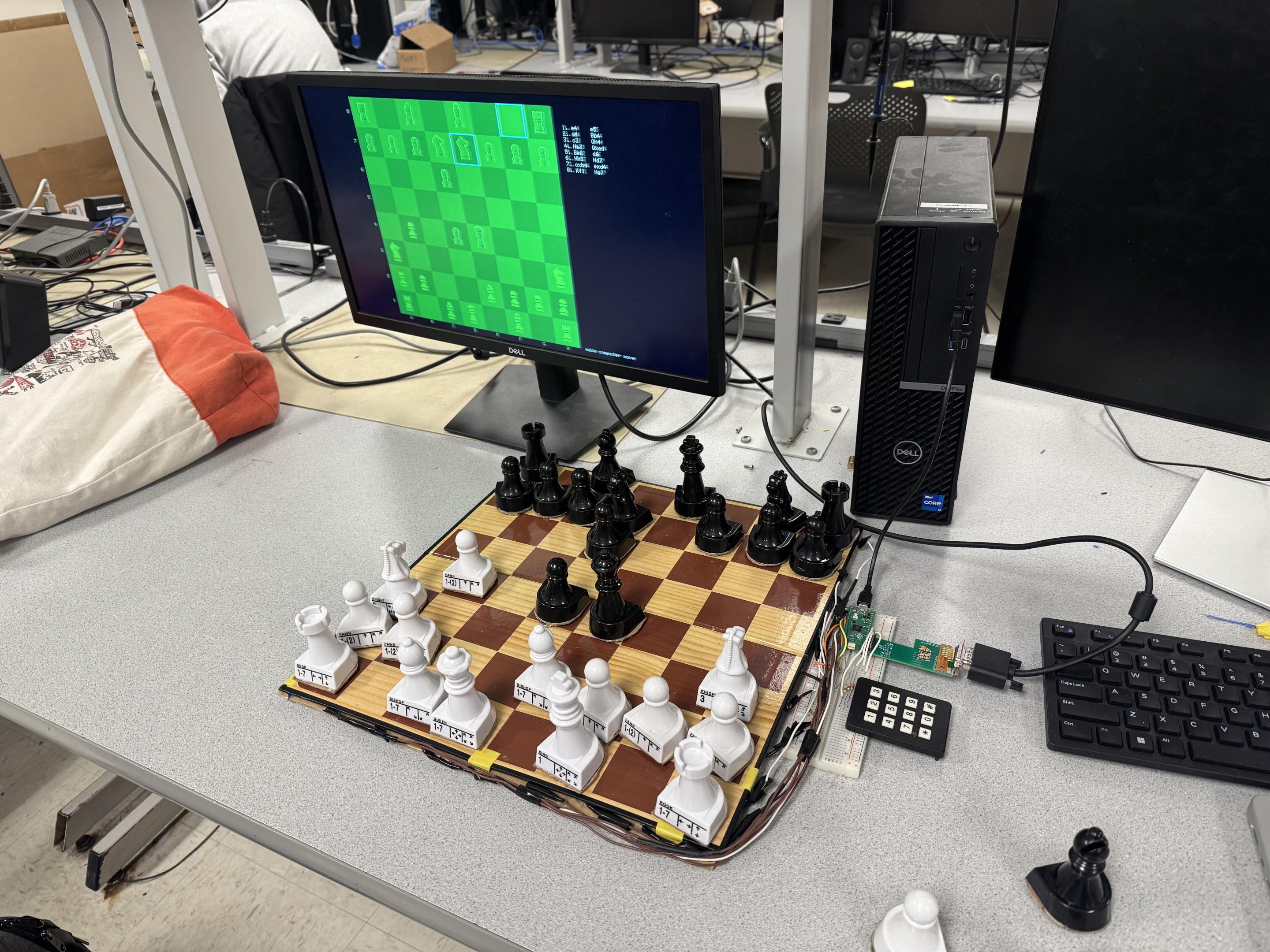
This project creates a physical, interactive chess game that combines the tactile experience of a real chessboard with the functionality of modern chess applications. The system uses a Raspberry Pi Pico (RP2040) microcontroller to interface with a physical chessboard equipped with reed switches and magnetic pieces, enabling automatic piece detection. Players interact with real chess pieces on a physical board, while the system provides visual feedback on a VGA display, legal move hints when pieces are picked up, and an optional computer opponent.
The system supports both two-player and single-player modes, with additional features including optional game timing and move hints. The implementation includes all standard chess rules: check, checkmate, en passant, pawn promotion, and comprehensive move validation. The board automatically detects piece movements and validates each move in real-time.
High-Level Design
Rationale and Sources
The motivation behind this project was to create a physical chess game that combines the tactile experience of a real chessboard with the functionality of modern chess applications. Unlike purely digital chess games, this system allows players to interact with physical pieces while receiving visual feedback, legal move hints, and optional computer assistance. The project draws inspiration from online chess platforms but maintains the traditional feel of moving pieces by hand.
The system integrates several key technologies: reed switch-based piece detection for automatic board state tracking, VGA display for visual feedback, a computer opponent using minimax search, and a keypad interface for game configuration. This combination creates a unique hybrid experience that bridges physical and digital gameplay.
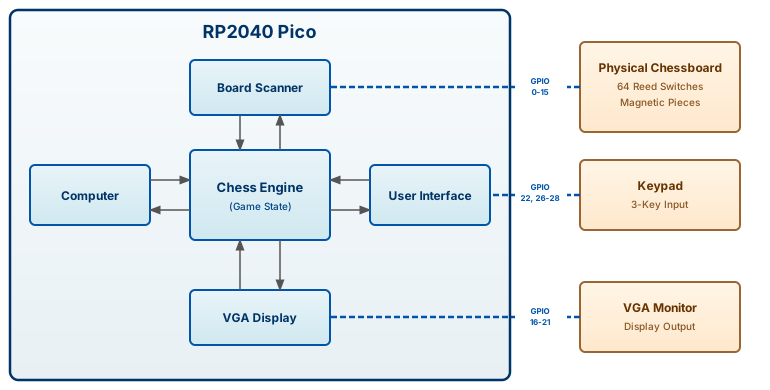
As shown in the block diagram above, the system consists of five software modules running inside the RP2040 Pico, which interact with three external hardware components. The Chess Engine serves as the central orchestrator, maintaining the canonical representation of the chess board, current turn, check status, and all game rules. The Board Scanner continuously monitors the physical chessboard, detecting when pieces are lifted or placed by reading the 64 reed switches. The Computer module implements the opponent logic using minimax search to calculate moves. The User Interface processes keypad input, handling menu navigation and game configuration. The VGA Display generates video signals to render the game state, legal moves, and menus on the VGA monitor.
The modules interact through a coordinated flow. When a player lifts a piece on the physical chessboard, the Board Scanner detects the change and queries the Chess Engine to identify which piece was lifted and request all legal moves for that piece. The Chess Engine responds with valid destinations and passes them to the VGA Display to render as visual hints. When the player places the piece, the Board Scanner calls the Chess Engine to validate the move. If valid, the move is committed to Game State. If invalid, an error is displayed.
In single-player mode, when it's the computer's turn, the Chess Engine requests a move from the Computer module. The Computer reads the current Game State, uses the Chess Engine's move generation functions to explore possibilities, evaluates positions, and returns its chosen move. The Chess Engine then updates Game State with the computer's move and signals the Board Scanner to enter verification mode. The Board Scanner monitors the physical board until the player executes the computer's move, creating a handoff where digital calculation is followed by physical execution. The VGA Display receives all rendering information from the Chess Engine, which provides the current board state, legal moves to highlight, and move history, ensuring the display always reflects the authoritative game state.
Hardware Design
The hardware design centers around the physical chessboard with 64 reed switches arranged in an 8×8 grid, each corresponding to a square on the chessboard. Magnets attached to the bottom of each chess piece activate the reed switches when placed on the board, enabling automatic piece detection. The system also includes VGA output for visual feedback, a keypad for menu navigation, and the RP2040 microcontroller coordinating all components.
Chessboard
The chessboard uses 64 Littlefuse MDSR-7-10-20 reed switches, one for each square. The switches are arranged in a matrix configuration with 8 rows and 8 columns. Each row is connected to a GPIO output pin (GPIO 0-7), and each column is connected to a GPIO input pin (GPIO 8-15) with internal pull-down resistors enabled. 330Ω current-limiting resistors are placed in series with each row to protect the GPIO outputs from overcurrent.
Diodes (1N4148) are placed in series with each reed switch to prevent current from flowing between columns when multiple switches are closed simultaneously. This is essential because when multiple pieces are on the board, multiple switches may be closed, and without diodes, current could flow between columns, causing false readings.

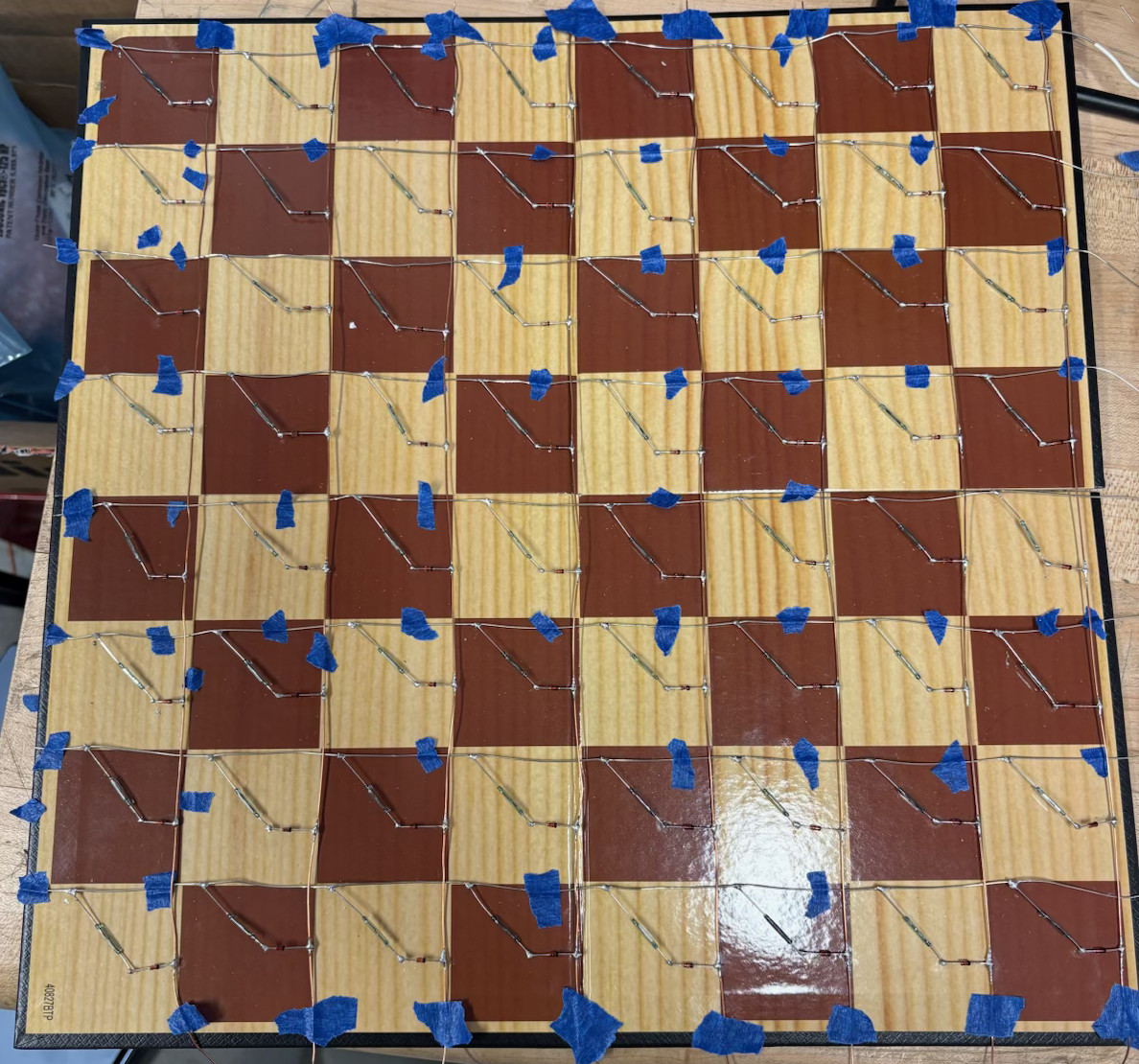
Right: Physical implementation with reed switches mounted on the chessboard during the construction process.
Chess Pieces
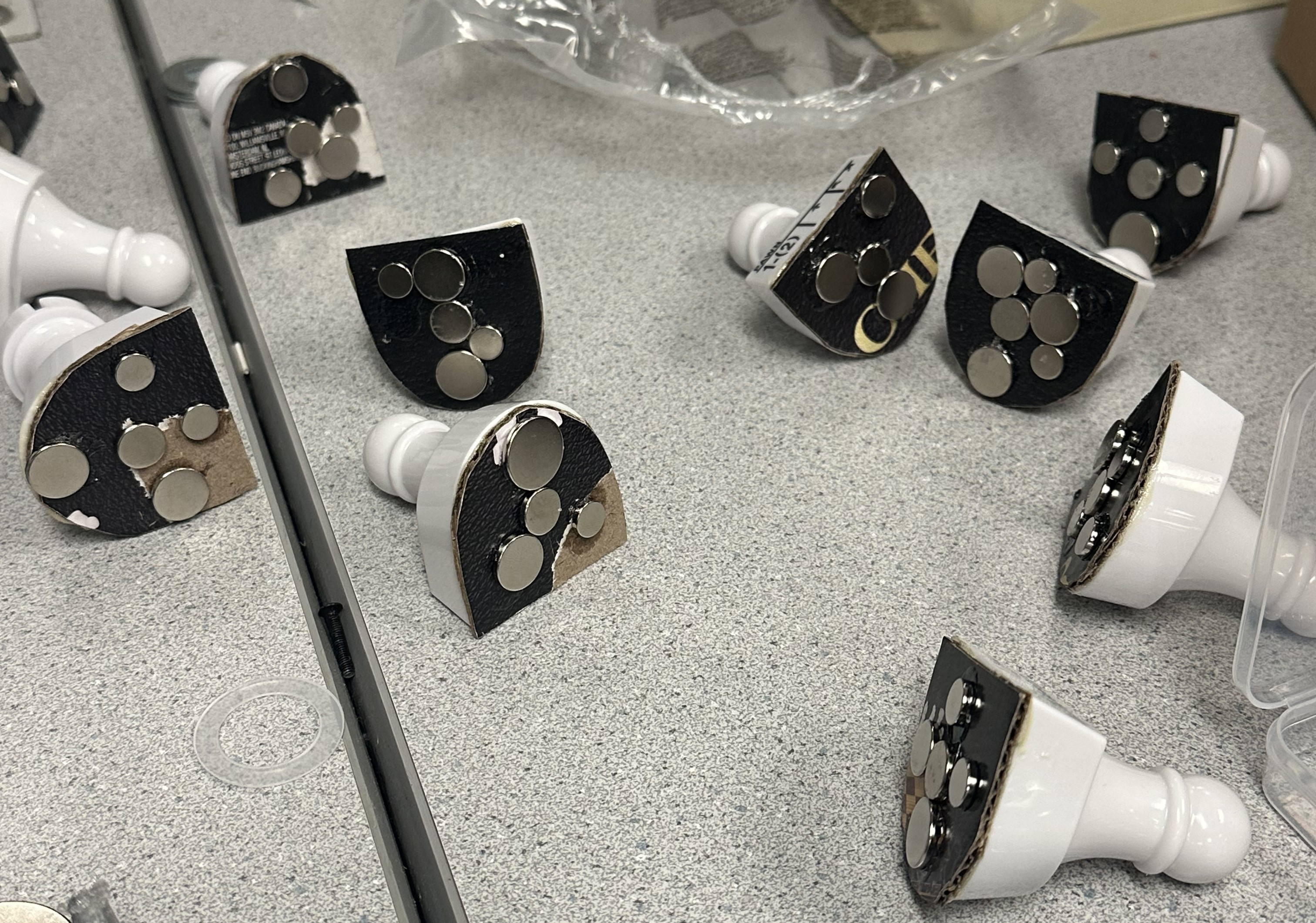
We attached multiple small neodymium disc magnets to the bottom of each chess piece. We experimentally discovered that the reed switches only close when a magnet is positioned directly over them, so a single small magnet didn't reliably activate the switch regardless of piece placement. To solve this, we placed 4-5 magnets spread across the base of each piece, ensuring at least one magnet is always over the reed switch. An alternative approach would be using larger, thinner magnets that cover more area with a single magnet per piece.
VGA Interface
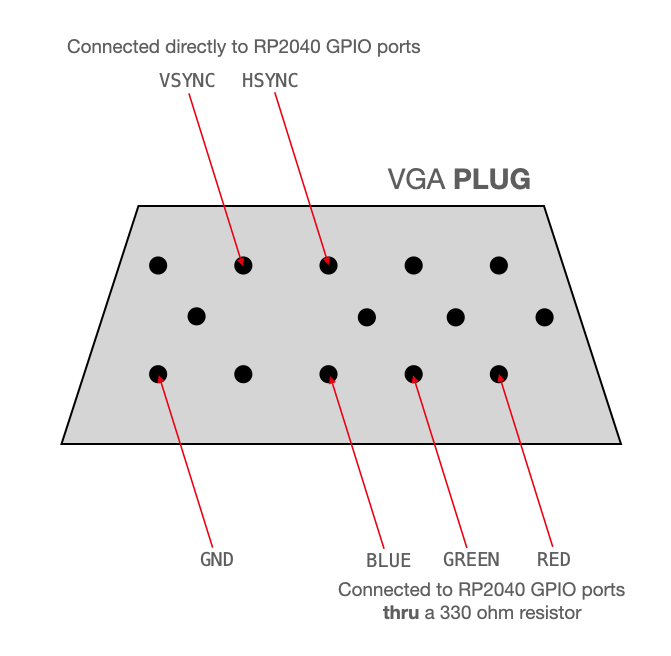
The VGA display connects to the RP2040 via GPIOs 16-21 and ground. HSync and VSync (GPIOs 16-17) connect directly to the VGA connector. The interface uses 4-bit color: 2 bits for green, 1 bit for blue, and 1 bit for red. Green gets more bits since human eyes are more sensitive to green.
For red and blue, 330Ω resistors create a voltage divider with the display's internal 70Ω resistor, stepping down the RP2040's 3.3V output to the 0.0-0.7V range expected by VGA. For green, the high bit uses a 330Ω resistor while the low bit uses 470Ω, enabling a more expressive range from the 2-bit green values.
Keypad Interface
The keypad works similarly to the chessboard: pressing a key closes a switch that shorts a row pin to a column pin. We use three keys (2, 5, 8) from a standard 3×4 matrix keypad. Row pins are configured as outputs and the column pin as an input with internal pulldown. Scanning sets each row high and reads the column to detect presses. A rising edge detector ensures that holding a key registers as only a single press.
Software Design
The software architecture uses protothreads for concurrent task management, with two main threads handling board scanning and keypad input. The system is organized into five modules corresponding to the system block diagram: the Chess Engine, Board Scanner, Computer, User Interface, and VGA Display. Each module is implemented in separate source files with clear interfaces. The chess algorithms are based on techniques described in Cornell's AI Chess Algorithms.
Chess Engine (
chess.c/
h
)
The Chess Engine maintains the canonical 8×8 board representation, tracks turns, manages check status,
and enforces all chess rules. The board is stored as a 2D array of Tile structures containing
piece type and color.
Move Generation
The move generator populates an 8×8 bitmap of legal destinations for a selected piece. Sliding pieces (rooks, bishops, queens) iterate outward in each direction until hitting the board edge or another piece, stopping after captures. Knights use a lookup table of eight L-shaped offsets. Kings check all eight adjacent squares. Pawns move forward (one or two squares from start), capture diagonally, and can perform en passant when the opponent's pawn just advanced two squares. En passant is tracked via state variables that record the "passed through" square, cleared after each move.
Check and Checkmate Detection
Check detection locates the king, then generates moves for all enemy pieces to see if any attack the king's square. When in check, the move generator filters candidates by temporarily applying each move, testing for check, and restoring the board. Checkmate occurs when the king is in check and no legal moves exist.
State Management
The engine provides save/restore functions using memcpy() to copy the entire game state,
enabling the computer to explore hypothetical moves without corrupting actual state. A render-enable
flag suppresses VGA updates during search.
Board Scanner (
chessboard.c/
h
)
The Board Scanner translates reed switch states into game actions by comparing "expected" occupancy (from the Chess Engine) against actual occupancy (from hardware). GPIO pins 0-7 drive rows, and pins 8-15 read columns with pull-downs. Each scan cycle activates one row, waits 10μs for signals to stabilize, and reads all columns, completing in under 100μs. The 10μs delay is necessary. We initially used 1μs but encountered faulty readings due to insufficient settling time.
State Machine
A seven-state machine interprets player actions. The state machine also provides implicit debouncing: if a piece momentarily bounces during placement, the system transitions from IDLE to a lifted state and back to IDLE without registering an invalid state.
- BOARD_SETUP: Before game start; shows green/red borders for correct/incorrect piece positions.
- BOARD_IDLE: Board matches expected state; waits for piece lift.
- BOARD_OWN_LIFTED: Player's piece lifted; legal moves highlighted; awaits placement or return.
- BOARD_ENEMY_LIFTED: Opponent's piece lifted first (capture intent); awaits player's capturing piece.
- BOARD_BOTH_LIFTED: Both pieces lifted; awaits placement on capture square.
- BOARD_INVALID: Unexpected board state; shows error indicators until corrected.
- BOARD_COMPUTER: Computer calculating; yields to search algorithm.
- BOARD_VERIFY: Player must execute computer's move on physical board.
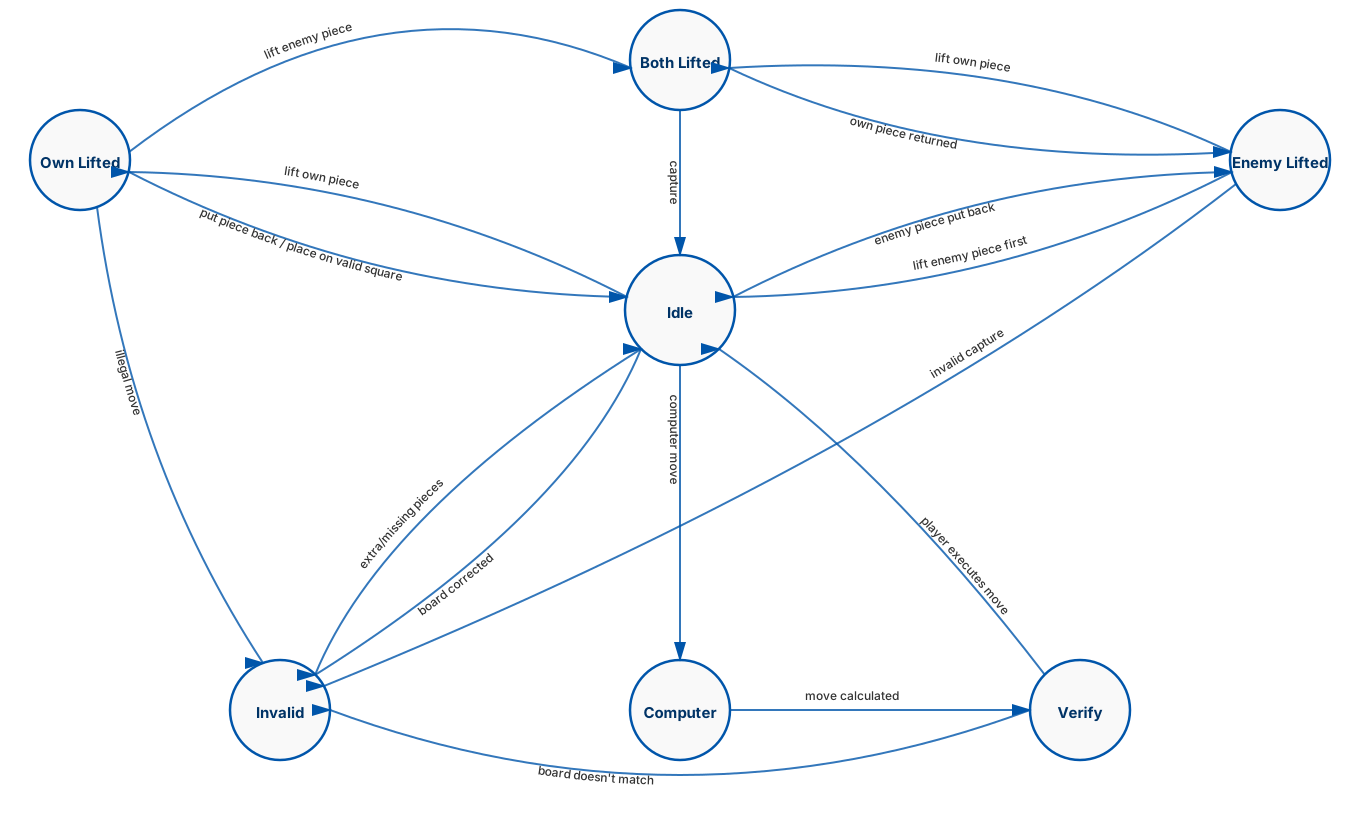
The distinction between OWN_LIFTED and ENEMY_LIFTED supports two capture
styles: some players lift their own piece first, others remove the captured piece first. When a
player lifts an enemy piece, the system checks if any friendly piece can capture that square. If so,
it waits for the capturing piece to be lifted. Once both pieces are off the board (BOTH_LIFTED),
placing the player's piece on the capture square completes the move.
The INVALID state handles error recovery by displaying red borders on squares missing
pieces and yellow borders on squares with unexpected pieces. The system waits until the board matches
the expected state before returning to IDLE. The VERIFY state is used after
the computer selects its move: cyan borders indicate the source and destination squares, and the
system waits for the player to physically execute the move before continuing.
Computer (
computer.c/
h
)
The Computer module implements an AI opponent using minimax search with alpha-beta pruning, constrained by a 2-second time limit.
Position Evaluation
The evaluation function combines material (pawns=1, knights/bishops=3, rooks=5, queens=9, kings=100), positional bonuses from piece-square tables (rewarding central knights, advanced pawns, safe kings), and mobility (counting safe squares each piece can reach, weighted by piece value). The final score weights material heavily (×100), adds position directly, and includes mobility (×10). These weights were not optimized and were chosen mostly arbitrarily to ensure the computer makes somewhat reasonable moves. There is significant room for improvement in tuning these parameters.
Minimax with Alpha-Beta Pruning
Minimax models chess as a two-player zero-sum game. The algorithm recursively explores the game tree, alternating between maximizing (computer's turn) and minimizing (opponent's turn) at each level. At leaf nodes, the static evaluation function scores the position. These scores propagate up the tree: maximizing nodes take the highest child score, minimizing nodes take the lowest. The depth of search determines how many moves ahead the computer considers.
Alpha-beta pruning dramatically reduces the search space by eliminating branches that cannot affect the final decision. The algorithm maintains two bounds: alpha (the best score the maximizer can guarantee) and beta (the best score the minimizer can guarantee). When evaluating a maximizing node, if any child's score exceeds beta, the remaining children are skipped because the minimizer would never allow this path. Similarly, at minimizing nodes, scores below alpha trigger cutoffs. With good move ordering, alpha-beta can reduce the effective branching factor from ~35 to ~25.
Move ordering improves pruning efficiency by examining likely-good moves first. Captures are searched before non-captures, sorted by MVV-LVA (Most Valuable Victim, Least Valuable Attacker), so capturing a queen with a pawn is examined before capturing a pawn with a queen. Non-captures are sorted by the moving piece's value.
Iterative Deepening
The algorithm searches to depth 1, then 2, then 3, etc., until the time limit expires. This guarantees a move is always available (using the best from the last completed depth) and provides natural time management.
Quiescence Search
At leaf nodes, instead of returning static evaluation immediately, the algorithm extends along capture sequences until a "quiet" position is reached. This prevents the horizon effect where a position appears favorable just before a devastating capture. However, due to the RP2040's limited processing power (typically evaluating only ~2,000 positions per move), we believe the search rarely reaches sufficient depth for quiescence to provide significant benefit.
User Interface (
user_interface.c/
h
)
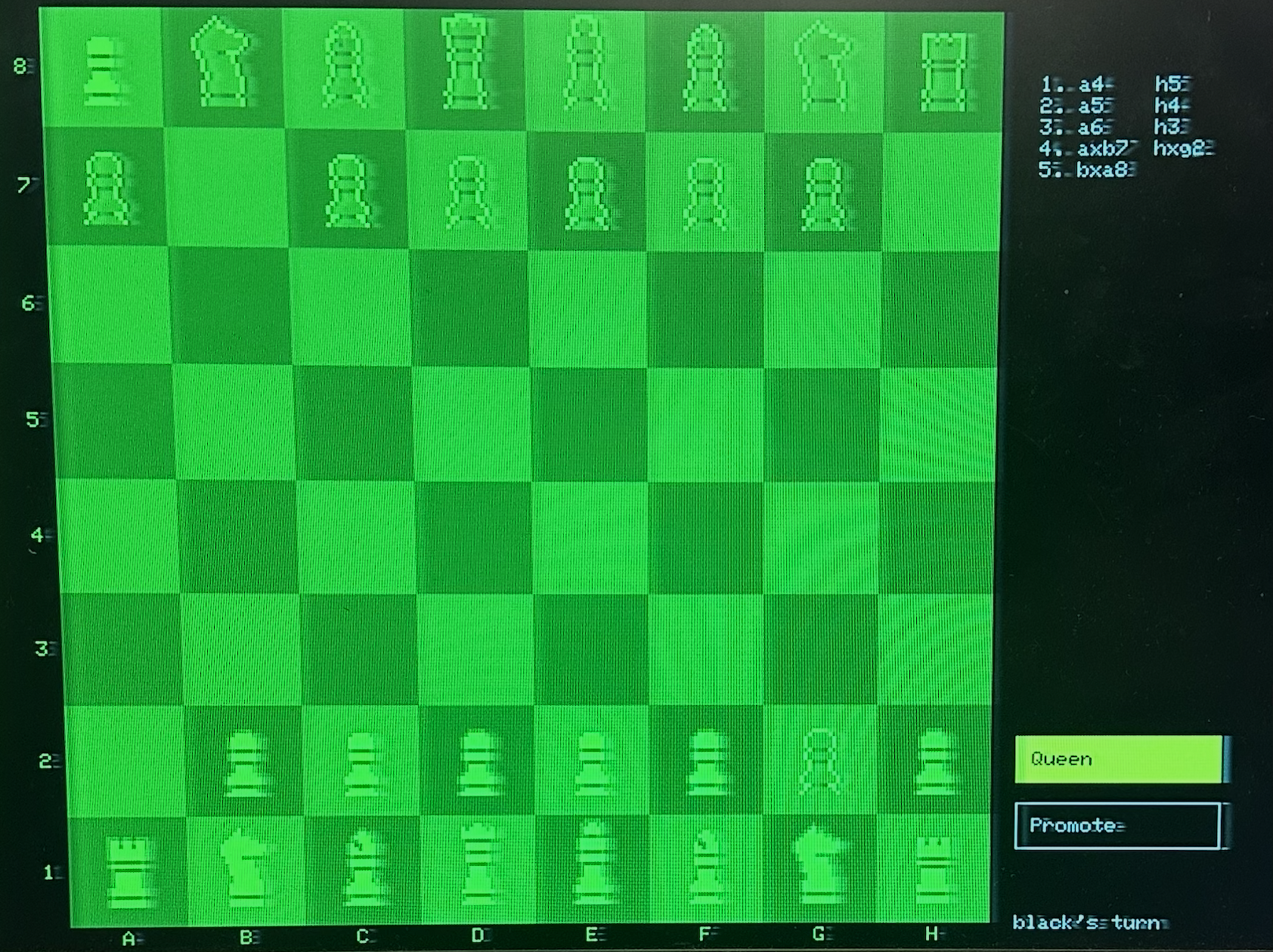
The User Interface handles keypad input, the pre-game menu, chess clocks, move history, and promotion selection.
Keypad and Menu
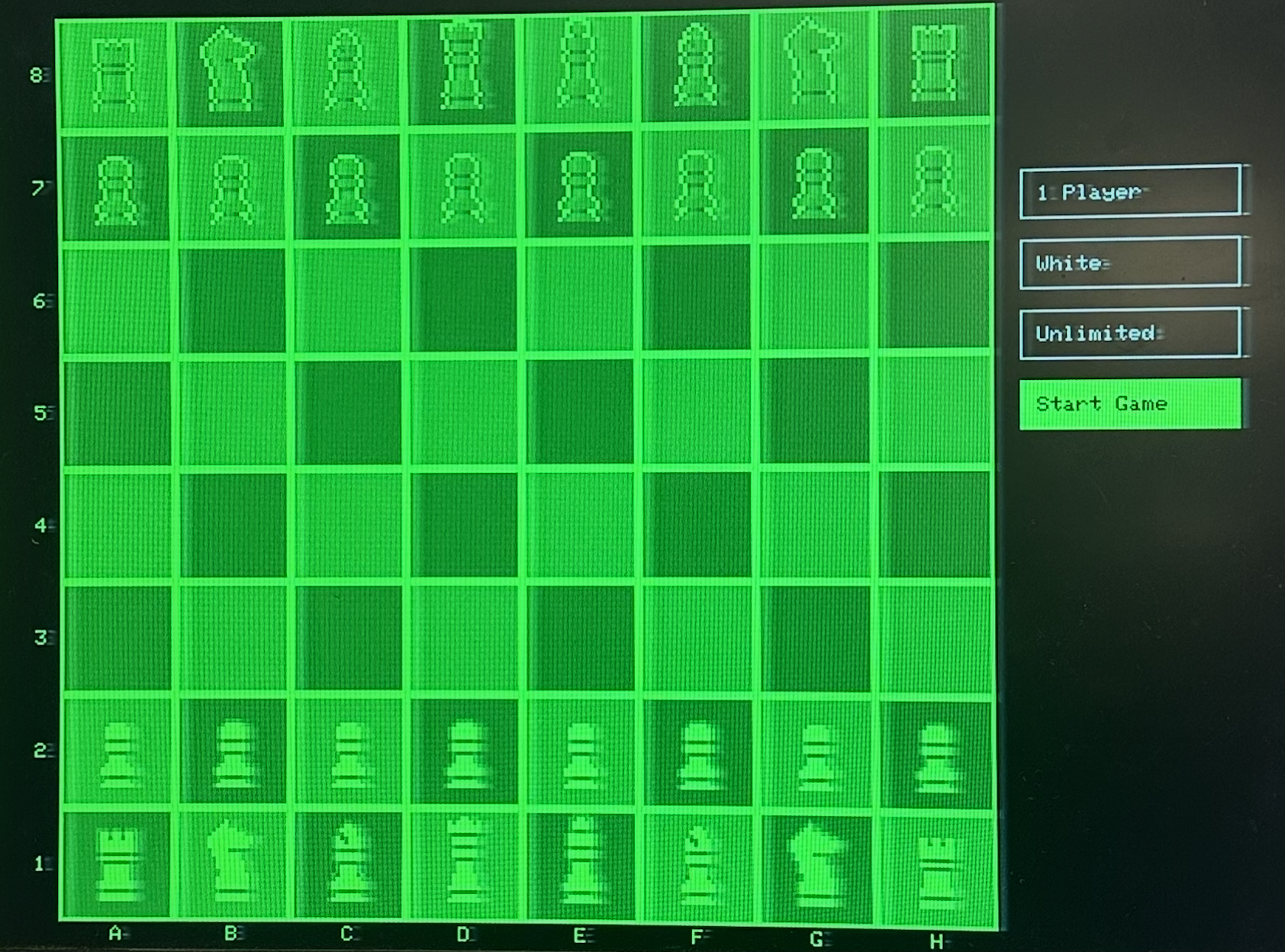
Three buttons (Up, Select, Down) use row-column scanning identical to the chessboard. Edge detection ensures held buttons register as single presses. The menu offers game mode (1-player, 2-player, debug), player color, and time control options. The Start button activates only when all pieces are correctly positioned.
Chess Clocks
Each player's time is stored in microseconds using time_us_64(). The display updates only
when seconds change, reducing redraw overhead. Timeout triggers immediate game-over.
Move History and Promotion
Moves are recorded in algebraic notation and displayed in a scrolling two-column list. When a pawn promotes, a menu appears for piece selection. The game pauses until confirmed.
VGA Display (
vga16_graphics_v2.c/
h
)
We use the VGA library provided by Professor Adams and Land. The library stores a 640×480 4-bit pixel
array in memory, supported by a front-end library for drawing shapes and text. In the backend, three
PIO state machines generate VGA signals: one for HSync, one for VSync, and one for pixel output. The
pixel state machine connects to the frame buffer via DMA, producing 60 Hz VGA signals while the game
updates at 30 FPS without
CPU intervention. Chess pieces are rendered from 28×28 pixel art sprites by
Etienne Pouvreau, stored with transparency in
chess_rom.h.
Main Program (
animation.c
)
The main program initializes hardware, then launches two protothreads. The board thread (30ms interval) scans reed switches and runs the state machine, triggering computer moves when needed. The keypad thread (20ms interval) handles menu navigation, timer updates, and promotion input. The system clock runs at 150 MHz.
AI Use
We used AI assistants for code generation and debugging throughout development. Specifically, AI generated
several functions in the computer module (quiescence search, minimax with alpha-beta pruning, iterative
deepening) and the entire keypad/menu interface in user_interface.c. All AI-generated functions
are annotated in the source code. We also used AI extensively for formatting and styling this website.
See Appendix: AI Prompt Log for detailed prompts and edit statistics.
Results
The final implementation of PicoChess is functionally complete and responsive. The VGA display renders smoothly with no visible flickering or tearing. Reed switch readings and keypad presses are detected with minimal latency, contributing to a smooth gameplay experience.
The success of our implementation is primarily evaluated through direct gameplay. We assessed the game based on the responsiveness of piece detection, the clarity of visual feedback, and how intuitive the physical interaction felt. Testing with multiple users confirmed that players could understand the system and play without technical instructions.
Speed of Execution
- Board Scanning: Complete 8×8 scan completes in under 100μs, with scans performed every 30ms
- Frame Rate: Stable 30 FPS game updates on 60 Hz VGA signal with no visible flicker
- Computer Response Time: 2 seconds per move (iterative deepening uses full time limit)
- Search Depth: Typically reaches depth 2-3, evaluating ~2,000 positions per move
- Move Detection Latency: Physical moves detected within one scan cycle (30ms)
- Keypad Response: 20ms polling interval with edge detection
Accuracy and Functionality
The reed switch detection system accurately identifies piece presence on all 64 squares. The system correctly distinguishes between piece lifts, placements, and captures. Move validation ensures all moves conform to chess rules, preventing illegal moves from being accepted. All implemented chess rules function correctly:
- Piece movement patterns (pawn, rook, knight, bishop, queen, king)
- Check and checkmate detection
- Move validation (prevents moves that leave own king in check)
- En passant capture
- Pawn promotion with piece selection
- Turn-based gameplay with timer support
- Move history tracking in algebraic notation
Usability
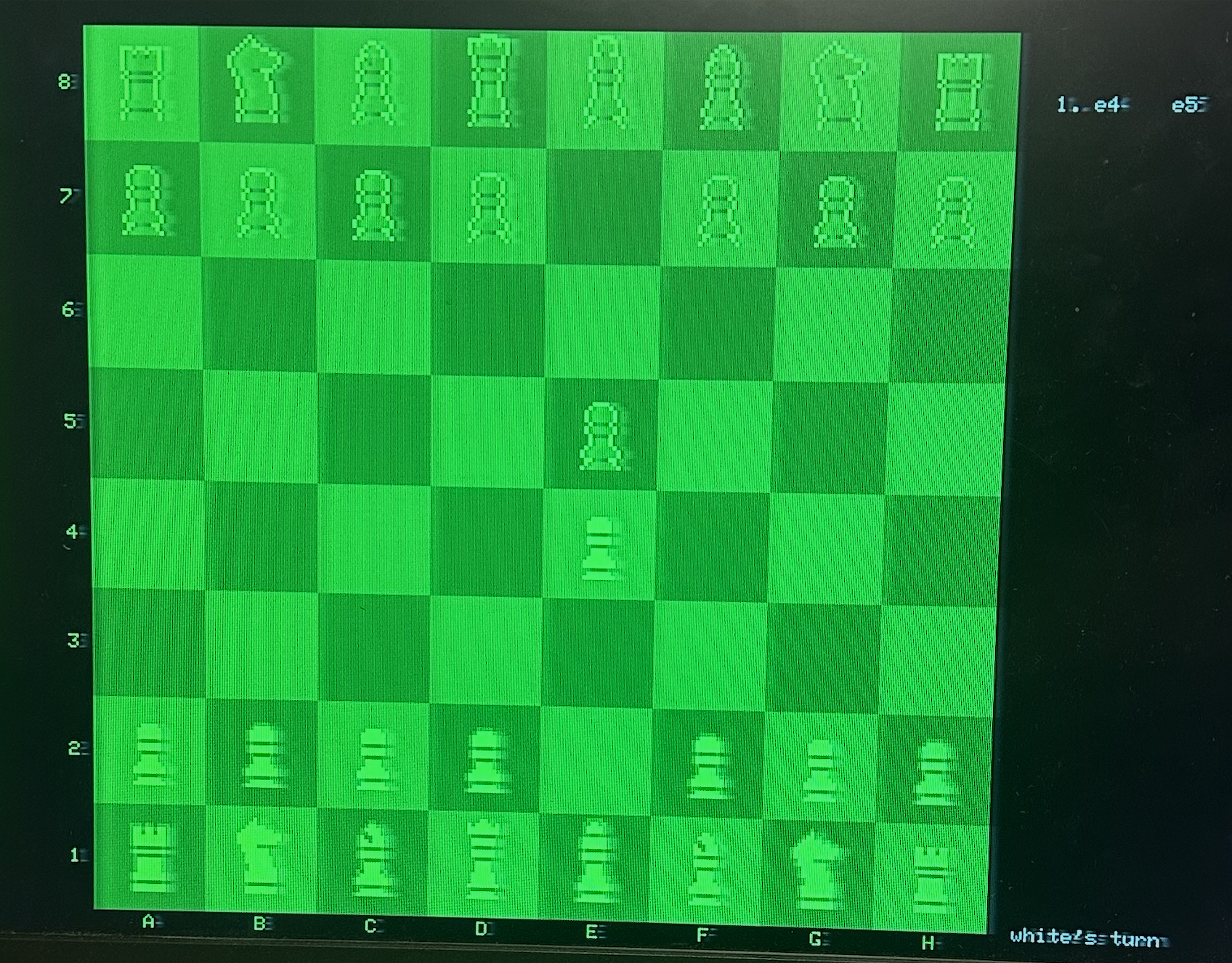
Before the game begins, the system verifies that all pieces are correctly positioned. Each square is highlighted with a green border when its expected piece is detected, or a red border when the piece is missing or misplaced. The game only starts once all 32 pieces show green, ensuring reliable detection before play begins.
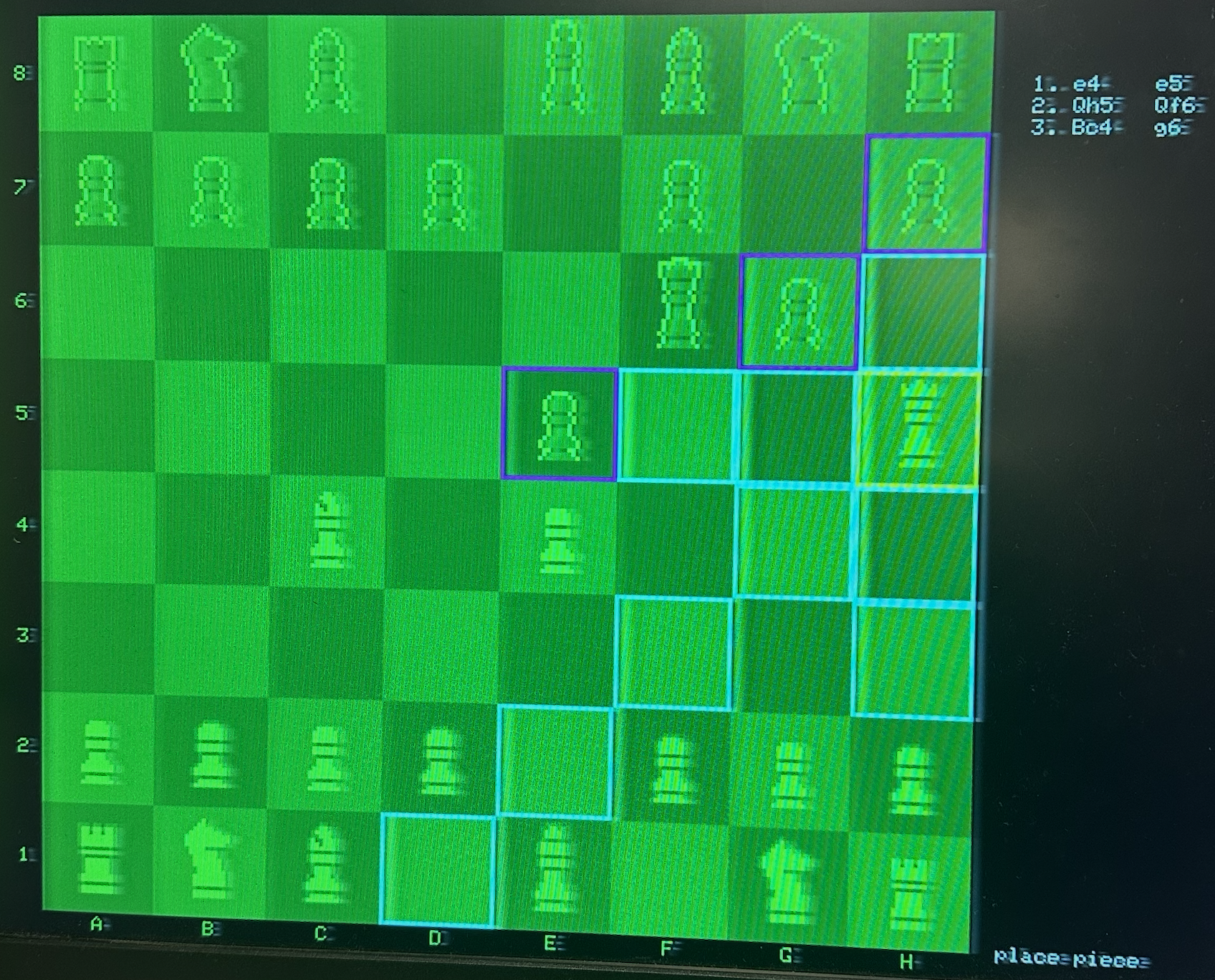
The system provides clear visual feedback throughout gameplay. When a piece is lifted, legal move destinations are highlighted with colored borders (cyan for moves, magenta for captures). Invalid board states trigger error indicators with red and yellow borders. The menu system allows easy configuration of game mode, player color, and timer settings. The physical board provides natural interaction while the VGA display supplements with game state information.
Computer Performance
The computer opponent plays reasonably and has achieved checkmate against inexperienced players. However, due to the unoptimized evaluation function, it tends to blunder pieces in certain positions. The shallow search depth (2-3 ply) limits its ability to see tactical sequences, and the arbitrary weighting of material, position, and mobility leads to suboptimal decisions.
One notable quirk: the computer strongly prioritizes putting the opponent in check, since check positions receive high evaluation scores. While checking moves are often strong, this bias causes the computer to pursue checks even when better quiet moves exist. Tuning the evaluation weights and increasing search depth would significantly improve play quality.
Safety
The project operates at safe voltage levels (3.3V logic, 5V USB power). All GPIO pins are configured with appropriate pull-down resistors to prevent floating inputs. Current-limiting resistors protect GPIO outputs when driving the reed switch matrix. The system includes error handling to recover gracefully from invalid board states.
Gameplay Screenshots
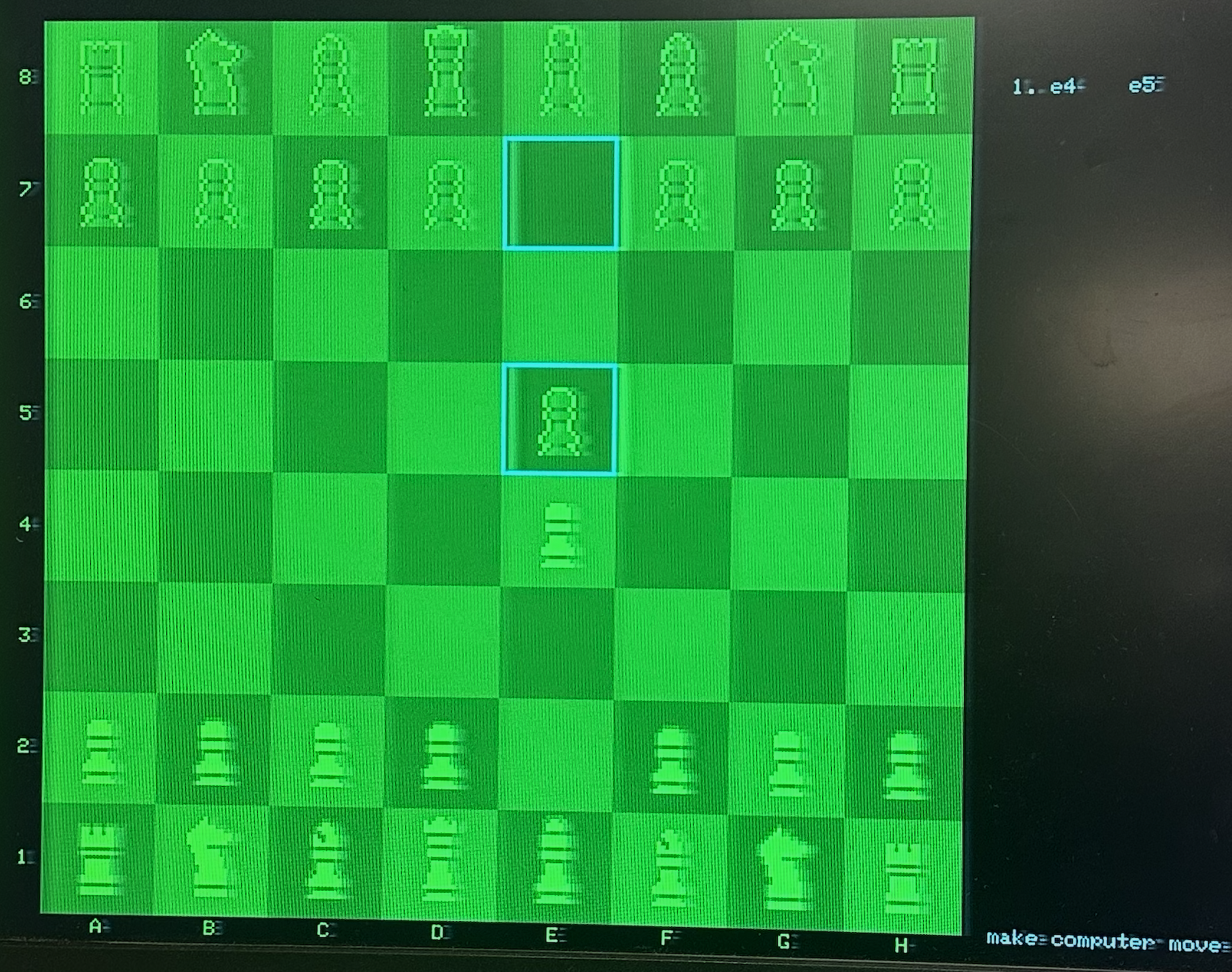
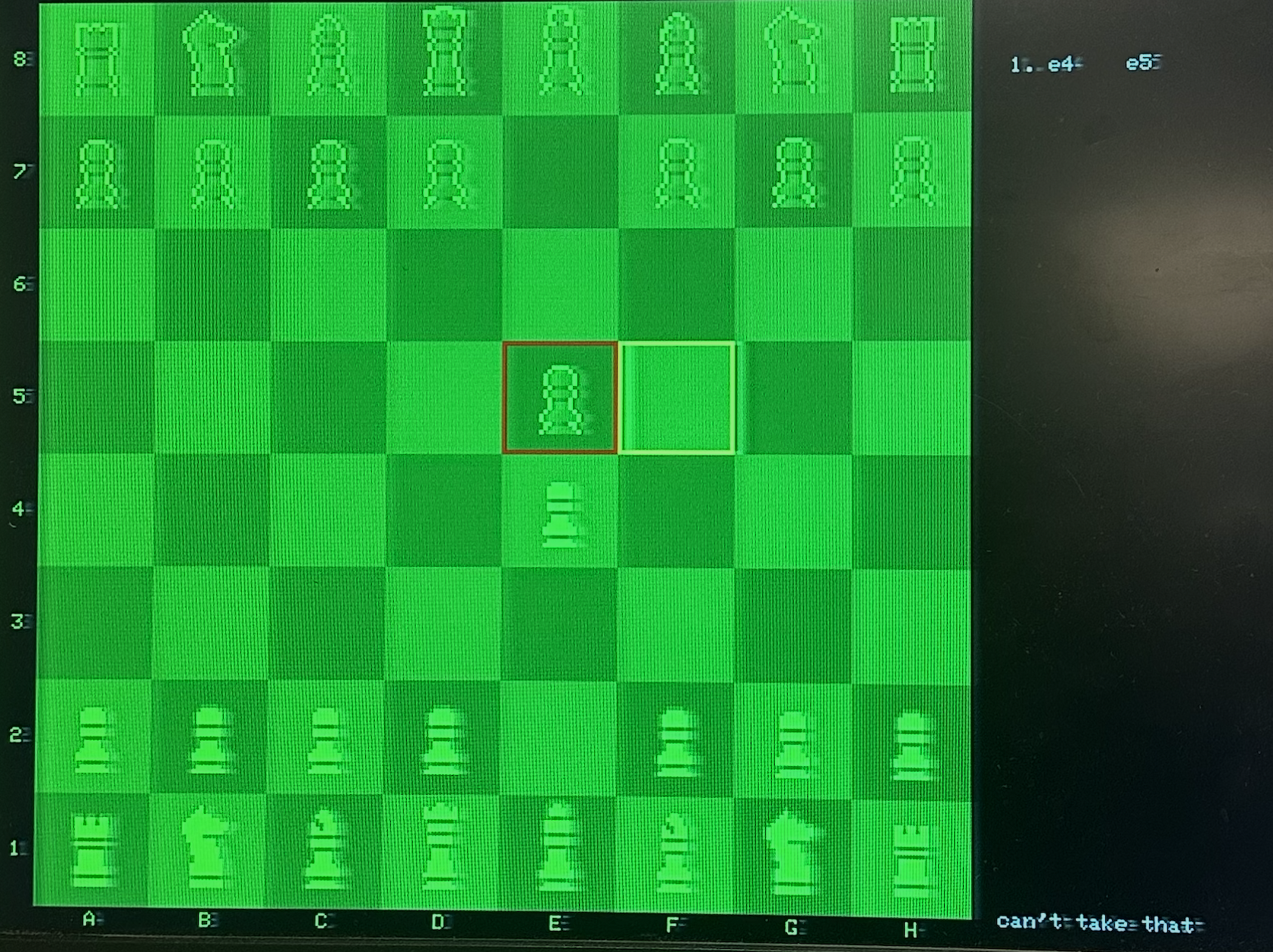
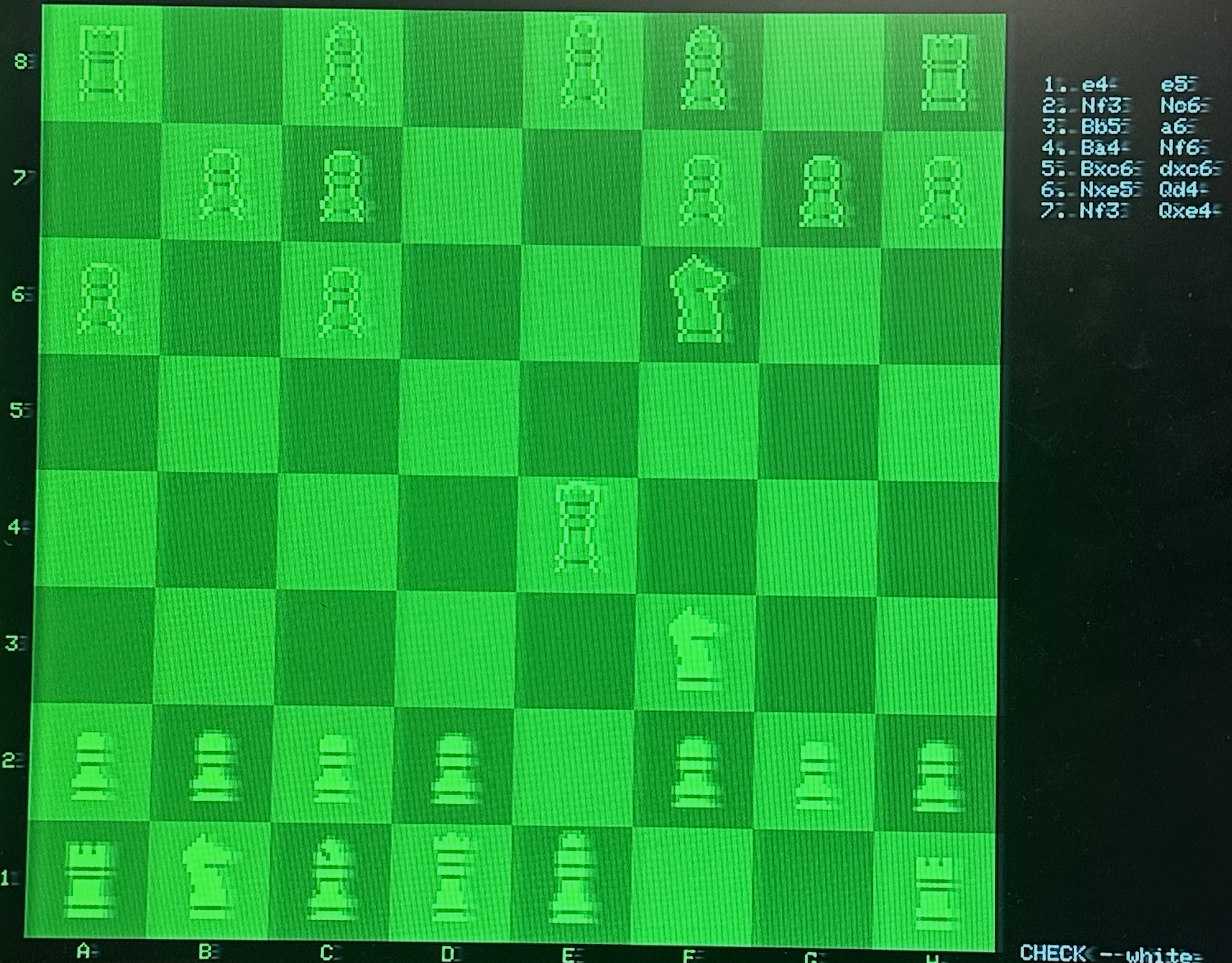
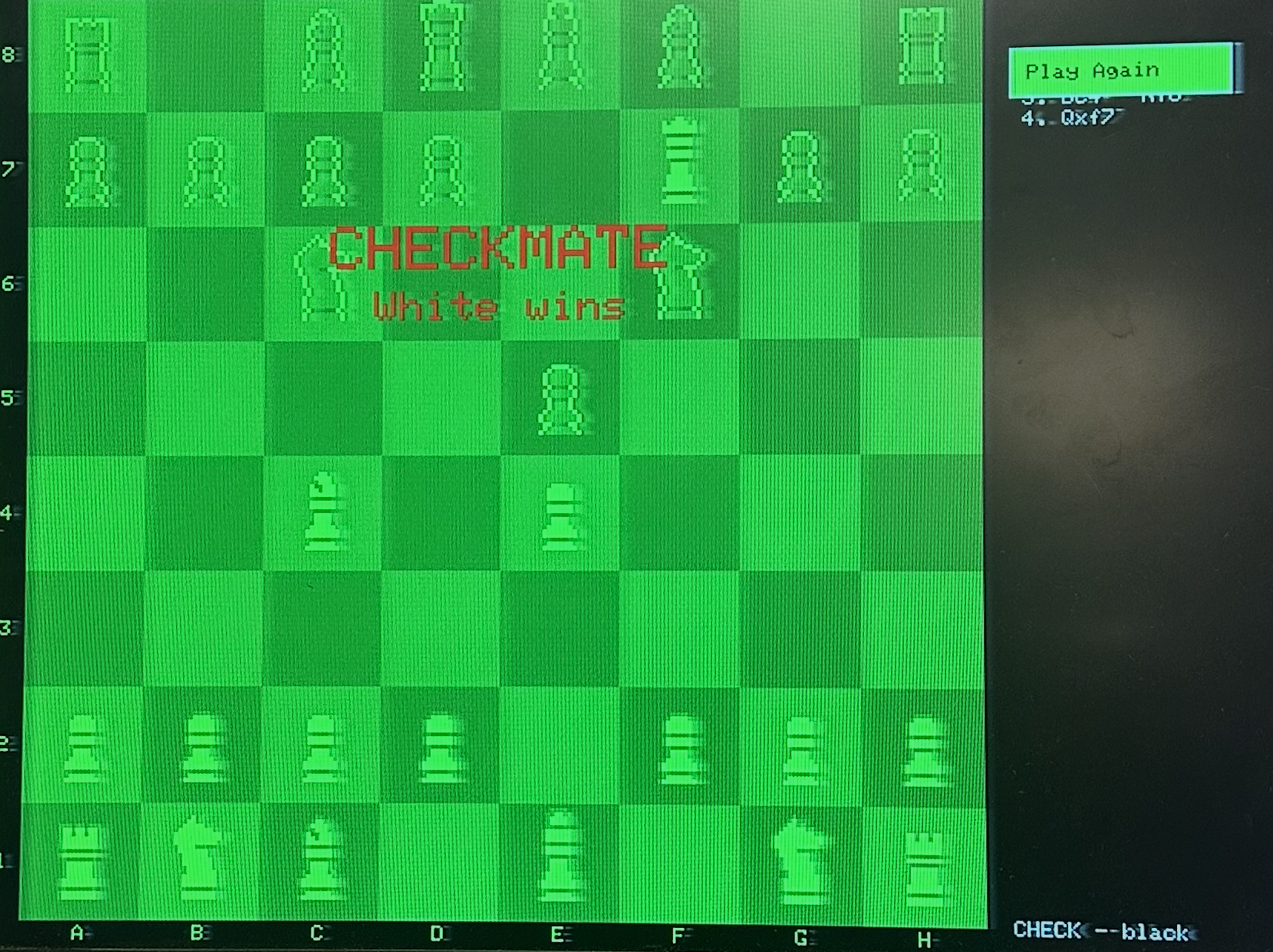
Conclusion
This project successfully demonstrates a physical chess game on the RP2040 that combines reed switch-based piece detection, VGA graphics, and a minimax-based computer opponent. The system bridges physical and digital gameplay, allowing players to move real pieces while receiving visual feedback and playing against an AI.
Intellectual Property Considerations
The chess engine and board detection system were implemented from scratch. The VGA graphics library was provided by Professor Adams. The minimax algorithm is a standard game programming technique, and our implementation is original. Chess piece sprites are by Etienne Pouvreau, released as a free asset pack. The project is for educational purposes only.
Future Improvements
Future work could add castling support to complete the rule set, implement sound effects for captures and checkmate, add an opening book for stronger early-game play, and improve the physical board construction with better cable management and more permanent reed switch mounting.
Appendix
Permissions
The group approves this report for inclusion on the course website.
The group approves the video for inclusion on the course youtube channel.
Parts List
| Part | Quantity | Cost |
|---|---|---|
| Littelfuse MDSR-7-10-20 Reed Switches | 64 | $37.07 |
| 330Ω Resistors | 11 | Free (lab) |
| 1N4148 Diodes | 64 | $2.50 |
| Chessboard with Pieces | 1 | $12.99 |
| Neodymium Magnets (DIYMAG) | 1 pack | $9.99 |
| Neodymium Magnets (TRYMAG) | 1 pack | $13.99 |
| 12-Button Keypad | 1 | Free (lab) |
| Raspberry Pi Pico | 1 | Free (lab) |
| Total | $76.54 | |
Source Code
Full source code is available in the interactive code viewer. The complete project includes the chess game engine, user interface module, computer player, and main program files.
Work Distribution
Rachel Lee: Tested/debugged magnet detection across board, attached magnets to chess pieces
Zephan Sanghani: Hardware assembly, software development
Kailey Ye: Soldered and constructed chessboard with reed switches
References
- Raspberry Pi Pico C/C++ SDK Documentation. Raspberry Pi Foundation. https://datasheets.raspberrypi.com/pico/raspberry-pi-pico-c-sdk.pdf
- RP2040 Datasheet. Raspberry Pi Foundation. https://datasheets.raspberrypi.com/rp2040/rp2040-datasheet.pdf
- VGA Timing Specifications. VESA. https://web.mit.edu/6.111/www/s2004/NEWKIT/vga.shtml
- Hunter Adams. VGA Graphics Library for RP2040. Cornell University ECE 4760.
- Cornell University. "AI Chess Algorithms." CS Boom 2004. https://www.cs.cornell.edu/boom/2004sp/ProjectArch/Chess/algorithms.html
- Etienne Pouvreau. "Pixel Art Chess Pieces Sprites." itch.io. https://smolware.itch.io/pixel-art-chess-pie
AI Prompt Log
computer.c
| Date | Function | Prompt | Edits |
|---|---|---|---|
| Dec 3 | minimax_alphabeta() |
Implement minimax search with alpha-beta pruning using the existing evaluate_board function | +104 −8 |
| Dec 3 | quiescence_search() |
Write a quiescence search function that continues searching captures until quiet, and integrate it into minimax | +72 −68 |
| Dec 3 | iterative_deepening_search() |
Wrap minimax in an iterative deepening loop that increases depth until time expires | +52 −10 |
user_interface.c/
h
| Date | Feature | Prompt | Edits |
|---|---|---|---|
| Dec 8 | Menu system | Implement a menu with toggle buttons for game mode, player color, timer, and enable/disable start button | +232 −39 |
| Dec 8 | Chess clocks | Add chess clocks with configurable time limits that count down and display in mm:ss format | +103 −17 |
| Dec 8 | Move history | Add a scrollable move history panel displaying moves in algebraic notation with move numbers | +193 −30 |
Note: Prompts were summarized by AI for readability.